
Trading on Your Black Berry
What trading on a BlackBerry means today
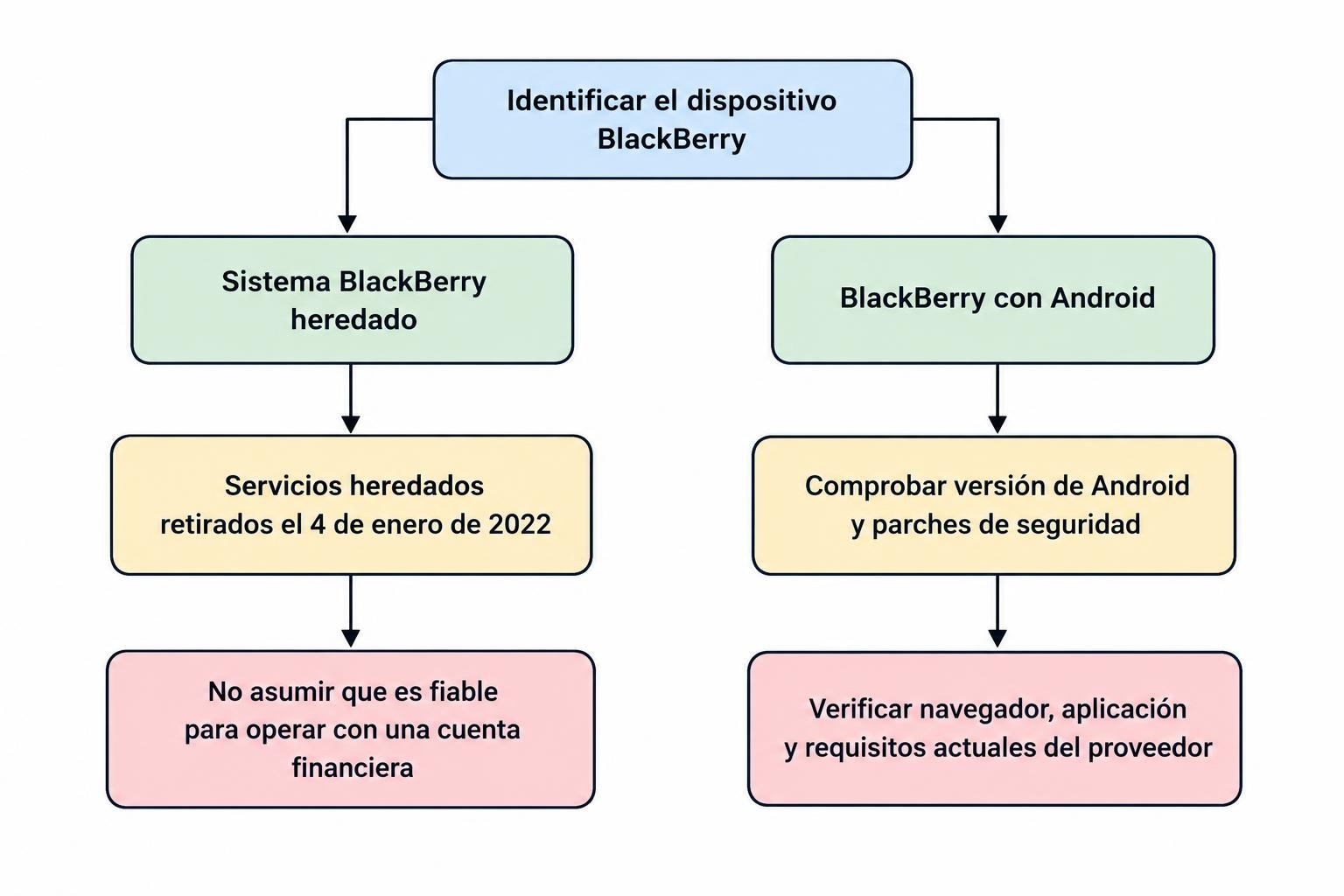
A BlackBerry can mean an older handset running a BlackBerry operating system or a later device running Android. That distinction comes before any comparison of trading applications. Software written for one environment cannot be assumed to work in another, and support changes as financial services update their login systems and applications. An old guide describing mobile dealing may therefore explain a capability that no longer exists on the same terms. The starting point is the handset actually in use, its installed operating system and the support available for that combination. A physical keyboard can remain comfortable to use long after the surrounding software has stopped receiving updates. Familiar controls do not establish that a device is still suitable for connecting to a financial account.
The appeal of the BlackBerry format is easy to understand. A keyboard can make it convenient to write notes, search for an instrument or respond to messages while away from a desk. A compact handset can also support a focused routine built around a watchlist and occasional account checks. Those advantages concern how the owner interacts with the device. Trading adds other requirements, including secure authentication, readable order details, current quotations and reliable confirmation of instructions. A phone can perform ordinary messaging tasks acceptably while falling short on those requirements. The assessment should therefore begin with the financial task rather than the general impression that the handset remains usable or that its keyboard makes it a productive device.
Legacy BlackBerry systems and Android are different cases
BlackBerry’s official notice on legacy service retirement identifies 4 January 2022 as the retirement date for legacy services associated with BlackBerry 7.1 and earlier, BlackBerry 10 and older PlayBook systems. That was a change to the supporting service infrastructure, not a statement that every stored document or local function would immediately disappear. It nevertheless prevents treating those devices as a current, dependable trading platform. Historic instructions for installing a broker application or receiving an alert do not establish continuing support. A legacy handset may retain value for reading saved material or making local notes, but its role should be assessed separately from any proposal to use it for live account access and time sensitive instructions.
Android based BlackBerry handsets require a different investigation. They should not be described as subject to the same legacy operating system shutdown simply because the brand is shared. Their practical position depends on the Android version, security patch level, browser and applications available for the particular device. A trading service may still install on one configuration while another rejects it. That does not settle whether the operating system and browser continue to receive appropriate maintenance. Record the actual versions rather than rely on a model name or an old review. The relevant comparison is between those installed components and the provider’s current requirements, with separate attention to whether both the application and the device platform remain supported.
App and browser compatibility
Installation is only the first test
An application’s minimum operating system requirement describes one part of compatibility. The store may also consider device characteristics, region and other requirements, and the broker can impose its own conditions on account access. TradingView’s mobile download guidance currently lists Android 8.0 or later for its Android application. That example is a requirement for one service, not certification that every BlackBerry running that version can perform every trading task. It also says nothing by itself about the handset’s security maintenance. Check the current official listing on the actual device before planning a routine around it. Minimum versions can change, and a result observed today should not be treated as a permanent compatibility guarantee.
A successful installation should be followed by checks of the functions the trader needs. A chart may load while authentication, account statements or order modification fails. A demonstration using a public watchlist does not establish that the funded account works correctly. The account provider may support a narrower set of configurations than the application developer. The distinction matters when asking for help: identify the device, operating system, application version and exact failing action so that support can address the actual combination. Avoid interpreting a generic statement that Android is supported as an answer about an ageing handset. Compatibility concerns the complete route through login, account information, instructions and records, rather than the presence of an application icon on the home screen.
A browser is another application with its own support limits
Browser access can appear to solve an app compatibility problem, but the browser must also be maintained. Google’s Chrome installation requirements for Android currently specify Android 10 or later. A device running an older Android version may retain an earlier browser that still opens some pages without receiving the current release. That is different from having a supported browser for a financial workflow. Switching from an app to a website does not automatically remove the underlying software problem. The trader needs current browser support as well as compatibility with the broker’s website, including login challenges, account screens and any required transaction confirmations. A page that appears visually complete can still fail at a later step.
Old application packages obtained from unofficial download sites create another problem. A file may be obsolete, altered or incompatible with the service that now accepts account instructions. Disabling security checks to install it does not establish a reliable solution. The official provider should be able to explain how its current supported application is distributed. If that route is unavailable for the device, an archived package is not equivalent to continued support. The same applies to browser workarounds that require ignoring certificate errors. The owner may be trying to preserve a useful handset, but the financial account should not depend on accepting an unresolved security warning. Device replacement and software compatibility are operational costs that belong in the trading decision.
Match the phone to the trading task
Research and monitoring place different demands on the device
Reading an article or reviewing a saved plan is different from submitting an instruction during a moving market. Educational material can be read at a slower pace and checked again on another device. Someone assessing an intraday routine can use website DayTrading to understand how preparation, monitoring and order management fit together before judging whether a phone supports that style. The relevant question is not whether a handset can display a price chart in isolation. It is whether the trader can complete the required work at the necessary times without losing clarity about the account. A device suitable for learning terminology may still be unsuitable as the only route for managing a live position or resolving an uncertain order status.
For a day trader, the screen needs to show prices, quantity, instruction status and resulting exposure clearly enough for repeated decisions. A physical keyboard may assist text entry without improving the visibility of those fields. Switching between several screens can make it harder to compare a proposed action with positions already open. A method relying on rapid modification or several related instruments therefore places greater demands on the interface than a simple watchlist does. There is no reason to assume that mobile access must support the entire routine. Analysis and account preparation can take place on a maintained computer, with an appropriately supported phone used for a narrower task. The narrower role still requires testing and should not be inferred from ordinary browsing performance.
A swing trader may have more time to review information and act on an alert, but positions remain exposed between those reviews. The phone may be used to check an existing order or inspect a scheduled event rather than search continuously for another entry. That routine depends on reliable notifications, account visibility and an alternative access route if the handset stops working. A slower holding period does not make stale information acceptable. The trader still needs to know when a quotation was updated and whether an order change reached the broker. The useful distinction is between reduced decision frequency and reduced operating standards. Fewer actions can make a compact interface practical, but they do not remove the need to verify each action and the exposure left afterwards.
Investing and trading need different information
Longer term investors may use a phone mainly to read reports, review allocations or check cash and holdings. Detailed company analysis and portfolio reconciliation can be easier on a larger display, especially where several documents or accounts need comparison. Readers considering that routine can use UK Investing Website for background on investment approaches and services. Its UK focus should not be interpreted as determining rules or account eligibility in every country. A handset’s technical access is also separate from those questions. The broker, product and customer location determine the applicable service conditions, while the device determines whether the owner can interact with the account reliably. Both sides need assessment before a convenient reading device becomes the basis for a financial decision.
Notifications should support a defined plan rather than make every market movement appear to require intervention. A price alert can prompt a review without being an instruction to trade. On an ageing handset, test whether it arrives when expected and whether the application must remain open. Power management, connection changes and service settings can affect delivery, depending on the system. An alert also needs a clear source and timestamp so that it is not mistaken for a current observation after a delay. If the plan depends on a broker held exit instruction, a phone notification is not a replacement for it. Treat the message as information that may require verification, rather than as evidence that the account has already taken the action described in the plan.
Orders and risk controls on a compact screen
Inspect the instruction before submission
An order ticket should make the instrument, direction, quantity and order type readable before acceptance. Keyboard convenience does not eliminate errors involving decimal places, retained quantities or the wrong contract. An instruction for 1,000 units differs greatly from one for 1,000 shares or lots, and the account’s conventions must be understood. The trader also needs to distinguish reducing an existing position from opening another. Practise with the exact interface and account type in a supported demonstration environment where available. A general familiarity with the phone is not the same as familiarity with the broker’s ticket. The complete quantity and proposed exposure should be checked in the confirmation, rather than inferred from the final digits visible in a small entry field or a remembered default.
Position sizing should be calculated independently of the comfort of entering the number. A hypothetical purchase of 100 shares at $40 creates a $4,000 position. A planned exit at $38 would represent a $200 price loss if execution occurs there, before charges. The instruction does not guarantee that outcome because the market may trade or reopen beyond the selected level. An ageing phone does not change the exposure; it may simply make it harder to inspect. If a separate calculator or worksheet is used, verify that its quantity matches the accepted order. The financial result depends on the contract actually entered, not the amount intended when the plan was prepared on another device or written into a note.
Check what happened after a slow response
A delayed screen response can leave the trader uncertain whether an instruction reached the account. Repeatedly pressing submit may create duplicate exposure if the first request was already accepted. The platform needs a readable status and transaction history, while the trader needs another way to verify the account when the phone is not responding. A weak connection, application problem and broker rejection can produce different outcomes even if they all look like a delay from the handset. Check the resulting position before making another request. An interface that cannot establish this reliably is unsuitable for the task. The assessment should include the complete process after submission, rather than measure only how quickly the phone opens the ticket or accepts keyboard input.
Closing the application or losing the phone connection does not necessarily cancel an accepted broker order. Controls also differ in where they operate. MetaTrader 5’s trading principles documentation explains that its trailing stop calculation operates in the trading platform, while the resulting stop loss is held on the server. This is an example of why control location matters, not a claim that a BlackBerry mobile application provides the same trailing function as a desktop terminal. Check the exact application and account documents. The trader should know which instructions continue independently of the handset, which functions need another running system and how those arrangements are confirmed in the account. A familiar name does not establish identical behaviour across devices.
Ordinary stop orders also need to be distinguished from guaranteed exits. A trigger can lead to execution at a worse price after a gap or shortage of available liquidity. A guaranteed stop, where offered, has separate conditions and charges. A small mobile screen can make those distinctions easier to overlook if the trader relies on a label rather than reads the relevant terms. The phone’s role is to present and transmit the instruction clearly; it does not change what the order legally or mechanically achieves. Plan the maximum acceptable exposure with that limitation in mind. If the only available device cannot display the required information adequately, the appropriate response is to change the access arrangement rather than assume that a simpler screen creates a simpler risk.
Security and dependable account access
Support status matters more than the brand’s reputation
A reputation for business security does not establish the current condition of an individual device. The relevant questions concern operating system updates, browser maintenance, application support and the way account access is protected now. Hardware can continue working after software maintenance ends. Conversely, an application meeting its minimum version requirement does not establish that every other component remains appropriately maintained. For an old BlackBerry, those checks should be made separately rather than compressed into a general claim that the handset is secure or insecure. Financial access deserves a maintained combination of components. If the operating system no longer has a viable supported route, adding another security application does not automatically restore the maintenance provided by the original platform supplier.
Authentication needs to remain workable after a lost phone or failed application. A trader may rely on a password, an authenticator, a text message or another approved method, depending on the provider. Verify the supported arrangement and preserve recovery methods somewhere appropriate outside the handset. Keeping the account, email and every recovery route on one ageing device creates an avoidable dependency. The aim is to regain legitimate access without weakening security or improvising while a position is open. Test the recovery procedure within the provider’s normal controls before depending on the phone. A successful login today does not show that recovery will work after a broken screen, failed battery or change to the service’s authentication requirements later in the account relationship.
Keep payment and account changes outside improvised workarounds
An unsolicited offer to install a special trading application or repair account access deserves independent verification. Remote access can expose more than the intended trading screen, including email and authentication information. Contact the provider through independently obtained official details rather than use a number or download link supplied in the message. The same principle applies when a supposed support agent directs a payment to an unrelated person or asks for recovery codes. A genuine device compatibility problem does not establish the legitimacy of whoever offers to solve it. The trader should be able to identify the service involved and the permissions requested. A workaround that requires unrestricted access to the handset can create a larger problem than the original inability to open an app.
Connection quality and hardware condition affect availability as well as security. A battery that drains quickly or an unreliable charging connector can interrupt access at an inconvenient moment. Mobile network availability also depends on the handset’s radio capabilities and local carrier arrangements, which should be checked with the carrier rather than assumed from an old specification. WiFi access does not prove that cellular access will work when needed. These are practical dependencies for someone relying on a phone away from home. Assess the actual conditions in which the device will be used and maintain another access route. A setup tested only while charging on a stable home network has not established dependable use while travelling or during an interruption to the usual connection.
Testing the setup or moving to another device
Compare brokers using current account requirements
A broker comparison can help identify services to investigate, but device compatibility needs confirmation against the provider’s current requirements. Broker Listings is one source for researching brokers and platform choices. Its presence in the research process does not certify that a particular service supports a BlackBerry model. Ask about the exact operating system, browser or app version and the functions required. Also identify the legal entity and account type available to the reader’s location. A technically accessible page does not determine product eligibility or regulatory protection. The final comparison should connect the business, account and device configuration being considered so that general descriptions of mobile trading do not substitute for evidence about the actual arrangement the trader plans to use.
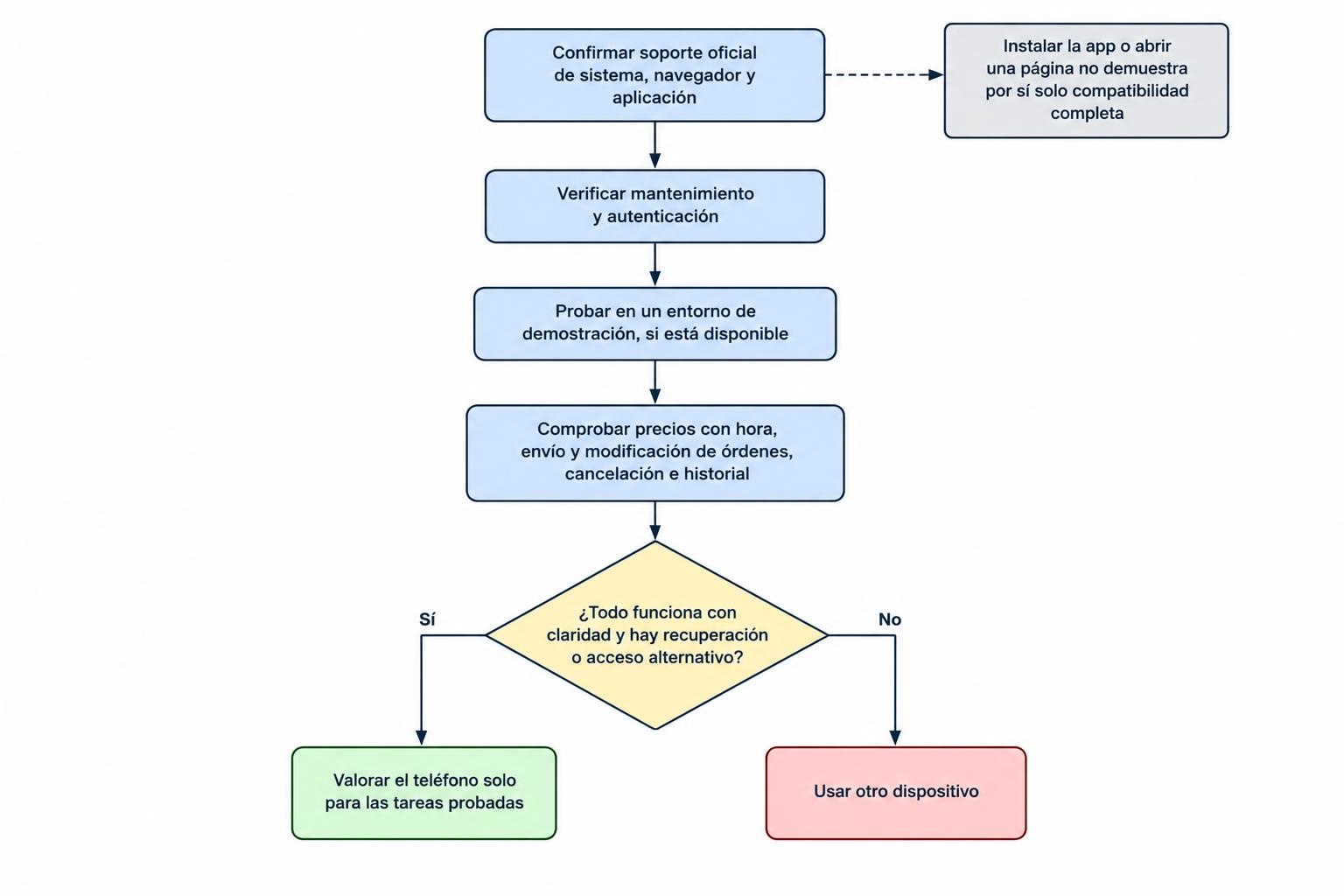
A trial should follow the complete proposed routine using public information and a supported demonstration account where available before exposing account credentials or money through an uncertain device. Confirm that prices show timestamps, controls remain readable and accepted instructions appear in the account history. Test modification and cancellation as well as opening. Check what happens when the application is closed, the connection changes or the device restarts. Record which tasks work and which are not supported rather than treating partial success as a complete pass. If the device lacks a maintained security foundation, a successful demonstration does not change that finding. Functional testing answers questions about behaviour; support and security checks answer different questions that must also be resolved.
The cost of replacing a handset should be compared with the cost of relying on an unsuitable one. No particular expensive model is required merely because the account involves trading. The relevant needs are a maintained operating system, supported applications, readable controls and dependable access under the trader’s circumstances. A keyboard preference can still influence the choice, but it should follow those requirements rather than override them. Keeping the old BlackBerry for nonfinancial tasks can preserve its practical value without making it the centre of account security. The decision becomes clearer when the proposed purchase is assessed as part of the trading setup, alongside data subscriptions and other operating costs, rather than as an unrelated consumer upgrade.
Moving accounts to another device requires preparation before the old phone is erased or retired. Confirm the official installation source, sign in through the provider’s supported process and verify authentication and recovery. Check that positions, instructions and transaction records agree with the broker’s account record. Saved chart layouts and local notes may need separate transfer because not every setting is synchronised. Revoke old sessions or permissions through the provider’s normal controls once the new arrangement is established. Avoid assuming that copying an application transfers its secure account access correctly. The objective is continuity of a verified account workflow, including access to records and outstanding instructions, rather than a visual copy of the old phone’s home screen or a collection of shortcuts whose destinations have not been checked.
Trading on a BlackBerry therefore depends on which BlackBerry is involved and what role it is expected to perform. Older legacy systems and Android based handsets require different technical assessments, while both need a realistic view of current support. A keyboard may remain useful for research and notes even when the device is no longer appropriate for a financial login. Where a maintained, officially supported combination exists, the next question is whether the interface suits the trading routine and can be tested completely. Where it does not, a different access device is the practical solution. The standard is a clear and dependable connection between the trading plan, accepted instruction and account record, with recovery available when the usual device stops working.