Common mobile trading mistakes include rushing order entry, trading because an alert appears, using too much buying power, and treating a frozen screen as proof that an order failed. These errors concern the trading process, not just market judgment. A reasonable trade idea can still produce an avoidable loss if the wrong quantity reaches the market.
A phone makes account access convenient. It does not make every moment suitable for a trading decision. The practical goal is to separate research, execution, and monitoring, then add checks where a small screen or interruption could cause trouble.
The following mistakes apply across many trading apps, although order behavior, account protections, and product risks vary. Use them to review your process rather than as a formula for profitable trading.
1. Letting Notifications Decide When You Trade
A price alert should prompt a review, not an automatic trade. The mistake is moving straight from “this asset is moving” to “I need a position,” without checking whether the opportunity still fits your plan.
App design can influence behavior. An FCA experiment involving more than 9,000 consumers found that digital engagement features, including push notifications and prize draws, can increase trading frequency and risk taking. That does not mean every notification is harmful. It means an alert deserves a filter.
Separate operational alerts from promotional prompts. Account security warnings and order updates serve a different purpose from trending asset messages or invitations to trade. Keep the notifications that support your process; switch off those that repeatedly pull you into unplanned decisions.
Before acting on a price alert, check the current price, your entry conditions, and the reason for the move. If the opportunity has already passed, dismiss it. Your phone does not need a trade as a thank you for buzzing.
2. Rushing the Order Ticket
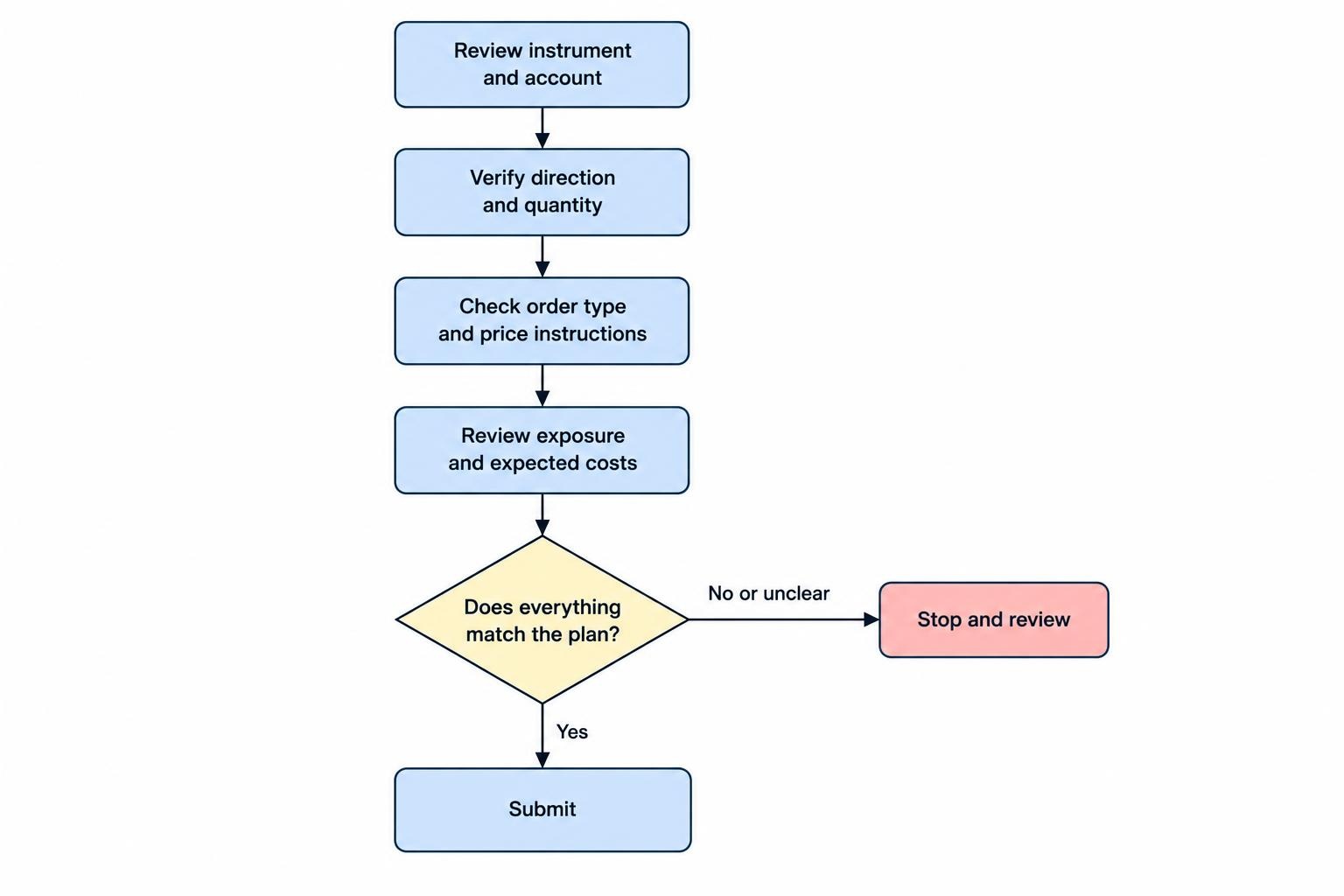
Knowing what you intend to trade is not the same as submitting the correct instruction. Treat the final order preview as a separate task, rather than a screen to tap through.
Read the ticket from top to bottom. Do not rely on a familiar logo, an abbreviated product name, or the quantity used in your previous trade. Pay particular attention when switching accounts, moving between markets, or returning to an unfinished ticket after an interruption.
| Field | What to verify |
|---|---|
| Instrument | The full name, symbol, and product you intend to trade |
| Direction | Whether the instruction buys, sells, opens, or closes exposure |
| Quantity | Whether the figure represents shares, contracts, units, or a cash amount |
| Price instructions | The order type and any limit or stop prices |
| Account and duration | The correct account and intended order expiry |
Read numbers deliberately. A quantity of 100 is not interchangeable with a $100 purchase. If you cannot explain the exposure shown on the preview, stop before submitting. Disable instant order submission while learning an unfamiliar interface, where the app offers that choice.
3. Choosing an Order Type for Convenience
The easiest order button is not necessarily the right instruction. For stock trading, a market order prioritizes execution but does not guarantee the execution price. A limit order controls the acceptable price but may remain unfilled. A stop order becomes a market order when triggered, so its stop price is not a guaranteed exit price.
A stop limit order adds price control after activation, but it can leave the position open if the market moves beyond the limit. These trade offs are covered in the SEC bulletin on stock order types.
Suppose a stock last traded at $40. That figure alone does not establish what your next market purchase will cost. Before submitting, decide whether immediate execution or price control matters more for the planned trade.
Check the broker’s instructions for the product and session you use. Do not assume an order behaves identically across stocks, derivatives, and other markets simply because the app uses the same label.
4. Sizing Positions From Available Buying Power
Buying power answers how much an account may permit you to trade. It does not answer how much you should put at risk. Starting with the maximum available amount reverses the decision process.
Begin with the loss you are prepared to accept under the trade plan, then assess the exposure needed. For a simplified stock example, buying 50 shares at $80 with a planned exit at $78 creates $100 of price risk before costs and any difference between the planned and actual exit. That is an estimate, not a loss guarantee.
Use a repeatable calculation rather than adjusting quantity until the potential profit looks attractive. The guide to position sizing for mobile traders covers that process in more detail.
Review combined exposure too. Five positions do not represent five independent risks if they all depend on the same market move. Write down what could hurt the account across several holdings, not just what could go wrong with the trade currently on screen.
5. Treating Margin Warnings as a Safety Net
A mobile warning is not a substitute for knowing your account obligations. For US securities margin accounts, losses can exceed the amount deposited, and a firm can sell securities to address a margin deficiency without contacting the customer first. These risks are set out in FINRA’s explanation of margin borrowing risks.
Do not build a plan around receiving a notification with enough time to transfer money or close the position yourself. Read the account agreement and establish how the firm calculates margin, handles deficiencies, and communicates account changes.
Before taking on borrowed exposure, ask whether you could manage the position during work, travel, or a period without phone access. If the plan requires uninterrupted attention that you cannot provide, change the exposure or reconsider the trade.
Rules and protections differ between securities margin accounts and other leveraged products. Avoid carrying assumptions from one account into another.
6. Ignoring Costs Because Commission Is Zero
Reviewing only the commission line leaves the cost check unfinished. Before trading, inspect the charges relevant to the product and account: spreads, currency conversion, borrowing or financing charges, exchange fees, and subscriptions where applicable.
Keep the arithmetic in cash terms. In a hypothetical trade, buying 100 shares at a $25.04 ask and immediately selling at a $25.00 bid would lose $4 if those prices and quantities remained available. That difference exists even with no commission.
The practical question is whether the expected opportunity makes sense after the costs you can identify. Repeated small trades deserve particular scrutiny because a modest expense per transaction can become material when repeated.
Use the mobile trading fees and costs guide to build a cost checklist, then compare it with your own account’s current pricing documents. Do not assume a fee shown for one market applies to another, or that a commission promotion makes every transaction inexpensive.
7. Resubmitting an Order After a Frozen Screen
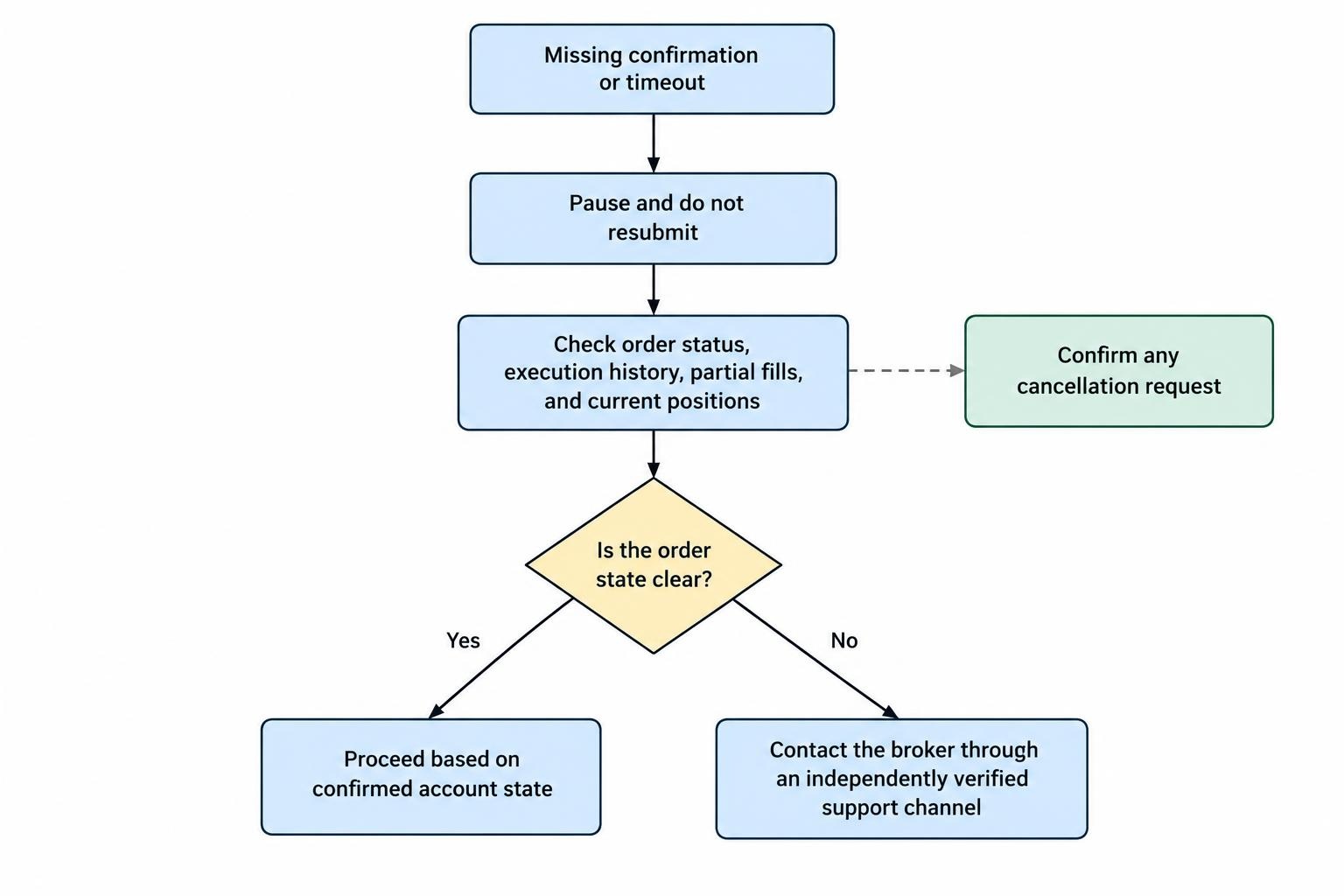
A spinner, timeout, or missing confirmation does not establish that an order failed. The dangerous response is tapping submit again before checking the original instruction. Investor.gov’s online investing guidance on execution and cancellation warns that investors can accidentally buy or sell twice by assuming an order was not executed.
Stop issuing new instructions while you establish what happened. Check order status, execution history, and current positions. Review partial fills as well as completed orders. A cancellation request also needs confirmation; receiving a request acknowledgement does not prove that the original trade was cancelled.
If the account state remains unclear, contact the broker through an independently verified support channel. Record the order identifier, time, and error message without exposing account credentials.
Keep an outage procedure available before you need it. The guide to handling a trading app disconnection with open positions focuses on that response. The immediate priority is establishing actual exposure, not making the screen look normal again.
8. Making Trading Decisions in Spare Moments
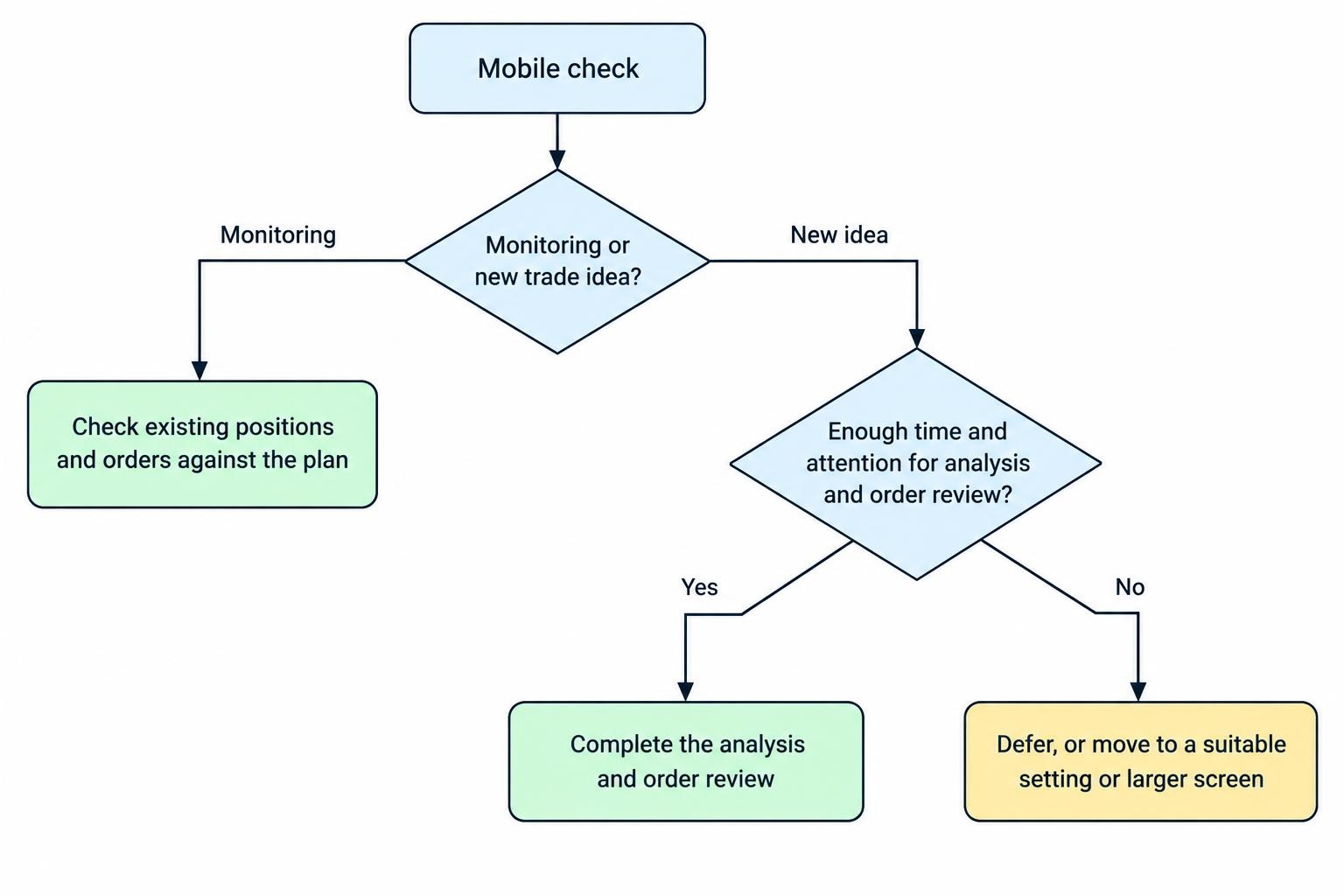
Checking a position while waiting for coffee and deciding to open a new one are different tasks. The mistake is treating every available minute as enough time for both.
Set minimum conditions for order entry: somewhere safe to stop, enough privacy to inspect the account, and time to finish the review without rushing. Do not place trades while driving or crossing roads. No chart pattern improves the case for stepping into traffic.
When reviewing a chart, check the timeframe, price scale, and quote timestamp before interpreting what you see. If your method requires several charts, read them in a fixed sequence instead of repeatedly changing views until one supports the trade.
Separate monitoring from decision sessions. During a brief check, establish whether existing positions and orders match the plan. Leave new analysis for a suitable setting. If the analysis cannot be completed clearly on the phone, move it to a larger screen rather than compressing the reasoning to fit.
9. Securing the Phone but Neglecting the Account
A device lock should be one part of account protection, not the entire plan. Use a different password for the trading account, enable multifactor authentication where available, and review security alerts. These measures form part of the SEC guidance on protecting online investment accounts.
Review the email account used for trading account recovery too. Keep recovery details current and store backup access information securely, separate from the phone where practical. Test that you know the recovery procedure before replacing or resetting a device.
For app installation, begin from the firm’s independently verified official address rather than an unsolicited message. Check the destination and publisher before entering credentials. Never share a password or authentication code with someone who contacts you claiming to resolve an account problem.
During account maintenance, also review connected services and remove access you no longer use. Convenience is worth assessing, especially where another service requests permission to view account information or submit instructions.
10. Chasing Losses and Reviewing Only the Result
After a losing trade, the next decision needs its own justification. Increasing size to recover a cash amount, entering without the usual checks, or changing the exit because realizing a loss feels unpleasant are reasons to pause.
Decide in advance what ends a trading session. That could include reaching a written loss boundary, breaking an execution rule, or becoming too distracted to review orders properly. Treat the boundary as a stopping condition, not something to renegotiate while watching the account balance.
Record the intended trade, actual execution, costs, and any process error. A trading journal kept on your phone can make those reviews easier without turning each entry into an essay.
Judge the process separately from the outcome. A profitable trade with the wrong quantity still contains an error. A losing trade that followed the plan does not, by itself, prove the process was wrong. Review patterns across entries before changing the method.
Build a Short Check Before Every Order
A useful mobile trading routine should be short enough to follow when markets are busy. Before submitting, confirm:
- The instrument, account, direction, and quantity match the plan.
- The order type, price instructions, and expiry are intentional.
- The exposure and expected costs are acceptable.
- You have enough time and attention to finish the task.
- No unresolved order could duplicate the intended position.
After submission, verify the order’s status and actual execution rather than relying on the button tap. Check that any planned exit instructions are present and match the filled position.
Mobile access is useful when it supports a controlled process. If the screen, connection, or setting prevents a proper check, waiting is a valid trading decision.