Mobile CFD trading lets you open, monitor and close contracts for difference through a smartphone or tablet. The convenience is straightforward. The risk needs more attention: a small order ticket can control a much larger market exposure, and losses do not pause when you close the app.
A useful mobile setup should make position value, trading costs and exit controls easy to check before you submit an order. This guide covers how mobile CFDs work, what to inspect in an app, and how to build a trading process that does not depend on watching every price tick.
How Mobile CFD Trading Works
A contract for difference is an agreement with a provider to settle the change in an underlying asset’s price between opening and closing the contract. You do not own that asset. A long position benefits from a rising price; a short position benefits from a falling price, before costs. ASIC’s consumer guidance on CFD mechanics and risks covers this distinction and warns that CFDs are complex, high risk products.
On a phone, the process usually involves choosing a market, entering a position size, selecting an order type and reviewing the trade. The screen may resemble a share dealing app, but the contract is different. Buying a share CFD does not give you the share or its voting rights.
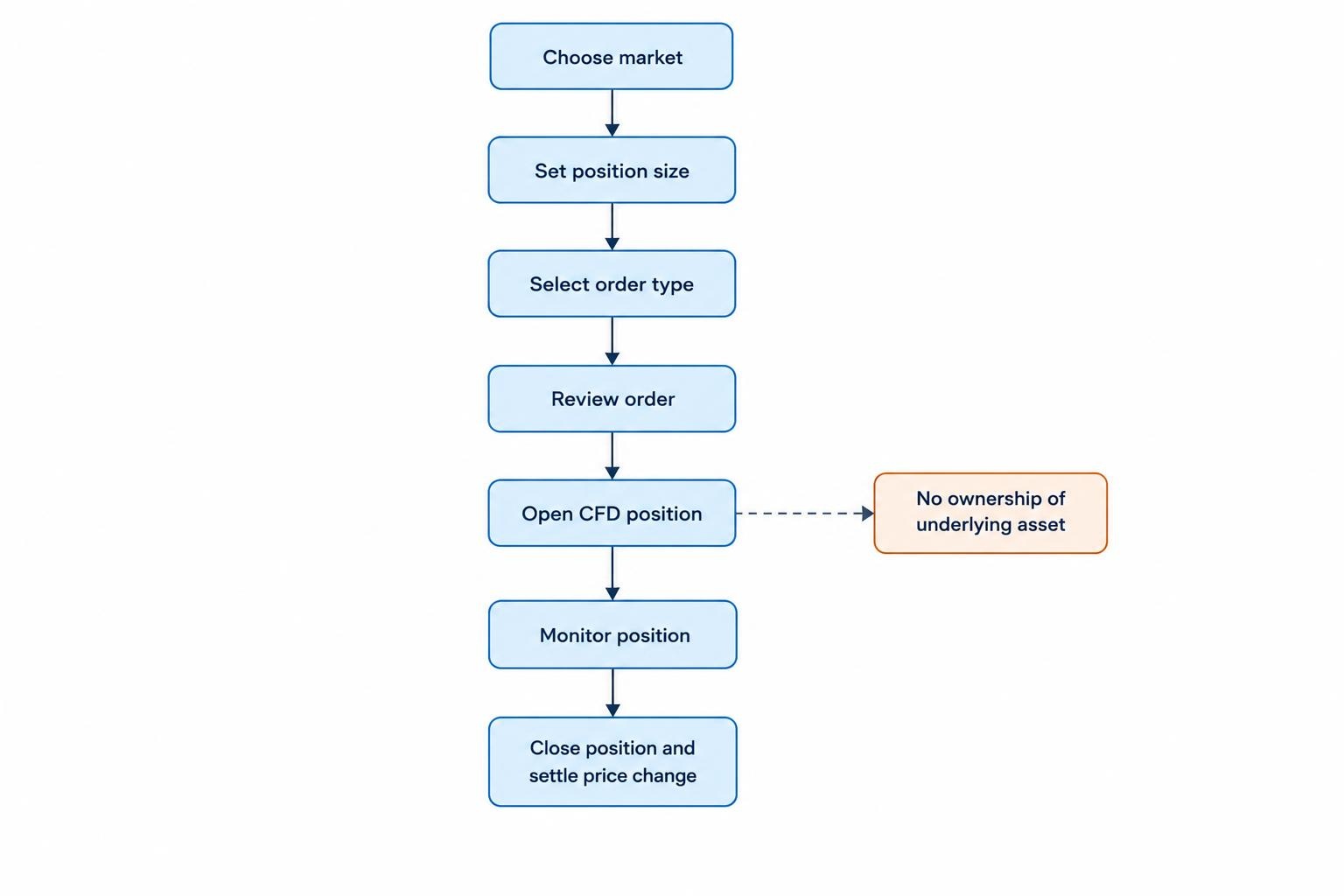
Read the product label rather than relying on the ticker symbol. A provider may display cash shares and share CFDs within the same app. Check which account you are using, whether the instrument is a derivative, and how the order quantity translates into financial exposure.
Check Eligibility Before Comparing Apps
Start with the legal entity that would hold your account, not the app’s rating. Check its regulatory permissions, whether it accepts residents of your country, and which customer classification applies. An international brand can operate through several entities with different terms.
US readers should not assume that an overseas app can lawfully offer them CFDs because registration or a download is possible. The CFTC’s enforcement outcome against 1pool involved unlawful retail commodity transactions offered as CFDs to US customers. App availability is not evidence of regulatory permission.
Before depositing, match the company name in the account agreement to the relevant regulator’s records. Check the permissions for the product being offered, not just whether a similar company name appears. Treat pressure to use another address, conceal your residence or accept a different client classification as a reason to stop.
Our guide to choosing a broker for mobile trading covers the broader account checks. For CFDs, give particular attention to execution terms, margin rules and the provider’s contractual rights to close positions.
Read Exposure Before Margin
Margin is the amount required to support a leveraged position. It is not the purchase price of the underlying asset, and it is not automatically the most you can lose on that trade.
Consider this hypothetical position, using an account and contract denominated in the same currency:
| Trade detail | Illustrative amount |
|---|---|
| Underlying price | $100 |
| Position size | 100 units, each representing one share |
| Total exposure | $10,000 |
| Assumed margin requirement | 20%, or $2,000 |
| Loss from a fall to $97 on a long position | $300 before costs |
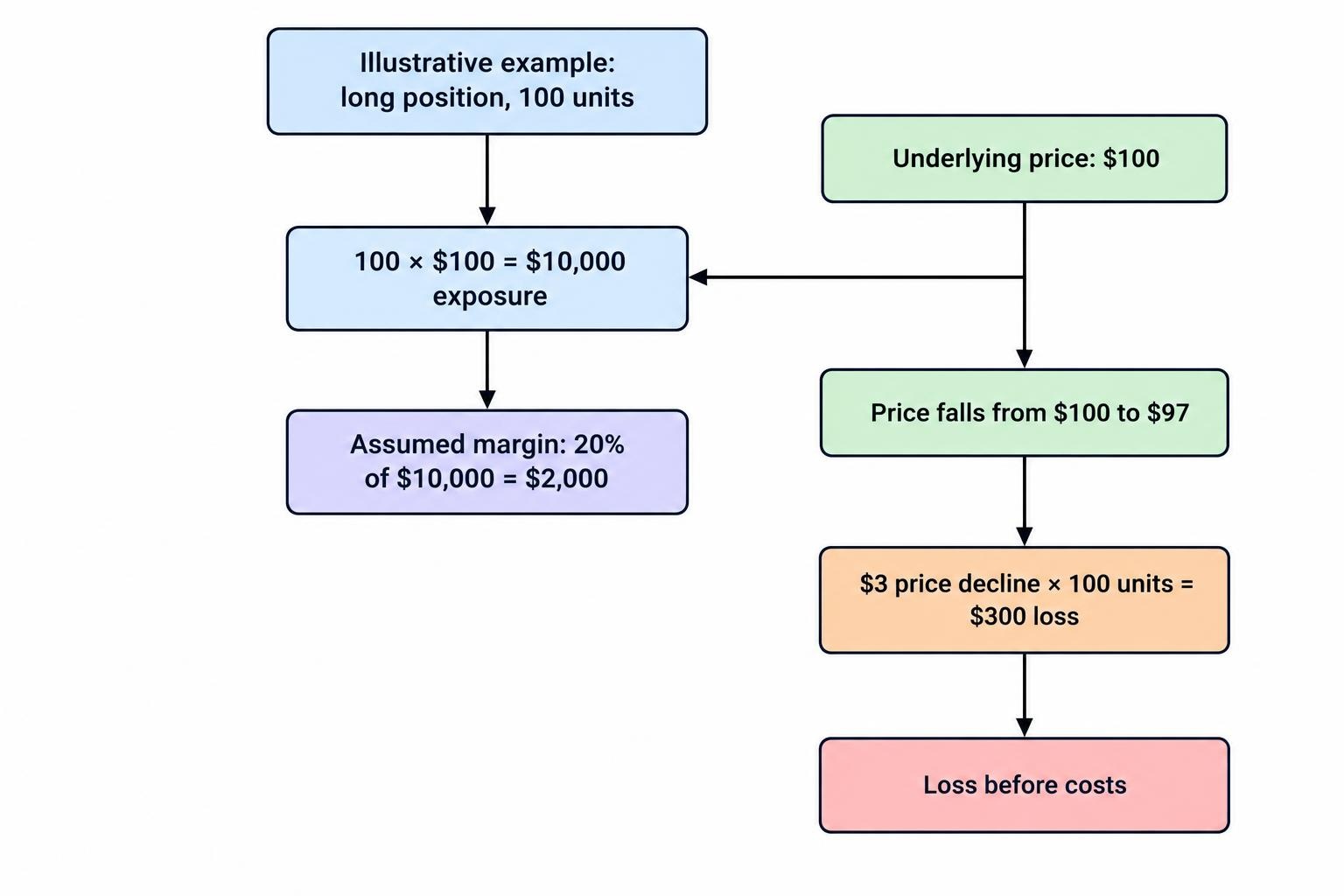
The underlying price fell 3%, but the loss equals 15% of the opening margin. If the account held $5,000 in equity before the trade, that same $300 loss would equal 6% of account equity. These percentages describe different things. The dollar loss stays $300.
A smaller margin requirement does not make an unchanged position less risky. It reduces the collateral required to open it. Judge the trade by its exposure and potential loss, then check whether the account can support it.
For UK retail clients covered by the FCA’s permanent CFD restrictions, leverage limits range from 30:1 to 2:1 depending on the underlying asset. The rules also require account margin closeout protection and negative balance protection. These safeguards do not prevent losses within the account, and they should not be assumed to apply to every overseas account.
Choose Size From the Planned Exit
Work backwards from the amount you intend to risk. In a simplified hypothetical example, a $60 risk budget and a $1.50 distance between entry and stop would allow 40 units before costs, assuming each unit gains or loses $1 for a $1 price movement.
That calculation is a starting point, not a loss guarantee. Allow for commissions, spread and possible slippage. If the minimum permitted trade size exceeds your budget, skip the trade rather than moving the stop closer simply to make the ticket fit.
What a Mobile CFD App Should Show
Assess the app through tasks you need to perform under pressure. A polished chart is useful; a readable position size and an unmistakable close button matter more.
During a demo session, check whether you can answer these questions without hunting through menus:
- What is the full exposure, and what does one unit or contract represent?
- What are the bid, ask and spread?
- How much margin will the order require?
- Are the stop and target expressed as prices, points or cash amounts?
- Which costs apply if the position remains open overnight?
- How will you confirm that the order or amendment was accepted?
Pay attention to quantity fields. “1” might mean one share equivalent, one contract with a multiplier, or another dealing unit. Do not transfer sizing habits from one market to another without reading the contract details.
Check the open positions view as carefully as the entry screen. Make sure it separates balance, equity, used margin and free margin, and that you can identify each position’s direction, size and attached orders. Avoid a layout where important figures disappear behind a keyboard or require repeated scrolling.
Trading Costs Need More Than a Spread Check
The spread is the difference between the quoted buying and selling prices. Other possible charges include commission, overnight funding and currency conversion. Their relevance depends on the contract, account currency and holding period.
Before entering, estimate the cost of both opening and closing the position, then consider how long you might hold it. “Zero commission” answers only one part of that calculation.
In its October 2026 review of CFD firms’ charging and disclosure practices, the FCA reported that overnight funding fees varied considerably between firms and underlying assets. It also raised concerns about how clearly some firms presented those charges. Check the rate and charging basis rather than assuming another provider’s terms apply.
As an arithmetic example, a $10,000 position charged at an assumed annual rate of 8%, using a 365 day basis, would cost about $2.19 per charged day. That is not a market quote. Your contract may use another rate, day count or charging schedule.
Read the treatment of weekends, market holidays, short positions and any contract expiry or rollover. Also check whether displayed profit and loss includes every charge. A green number on the positions screen may not tell the whole story.
For account charges beyond the contract itself, see mobile trading fees and costs. Keep the CFD review focused on the actual instrument you intend to trade, including its holding costs.
Stops, Limits and Mobile Order Entry
A market order prioritizes execution rather than a chosen price. A limit order sets an acceptable price but may remain unfilled. An ordinary stop can trigger an exit when the market reaches its trigger level, but its execution price is not guaranteed.
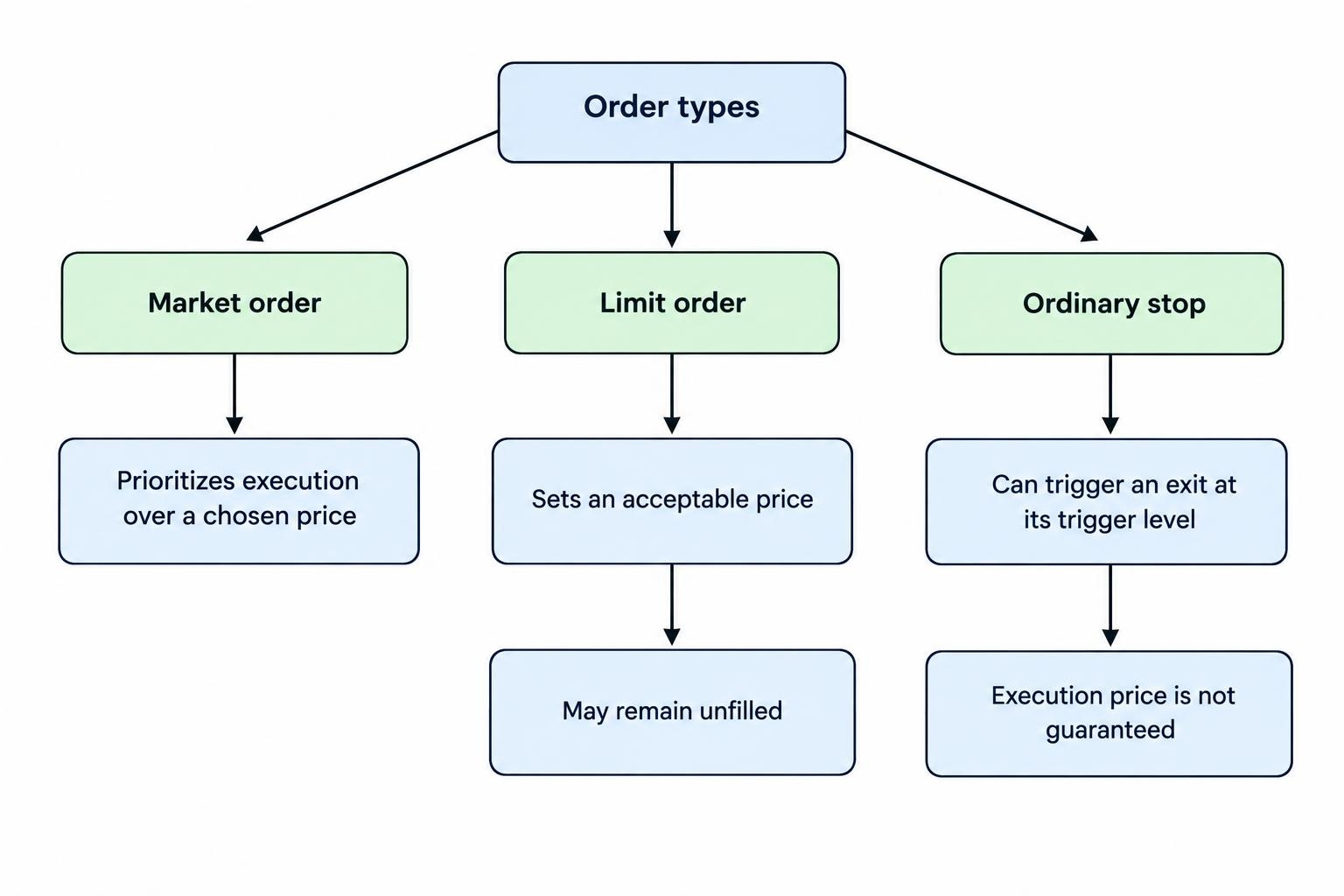
Price gaps and fast markets can produce an exit worse than the stop level. ASIC’s CFD risk booklet’s discussion of stop losses distinguishes ordinary stops from guaranteed stops. Where guaranteed stops are offered, inspect their charges, eligibility and contract terms before relying on them.
On mobile, the practical risk is entering the right idea with the wrong settings. A misplaced decimal, an old quantity or a stop entered in points instead of price can change the trade materially.
Use the review screen to read back the instrument, direction, quantity, order type and exit levels. After submission, inspect the accepted order or position. Do not assume an attached stop exists because you typed it into the ticket.
For partial exits, check what remains after the fill. Confirm the remaining quantity and whether the protective orders still cover it. Avoid repeated taps while the app is processing; first establish what the broker accepted.
Monitor Account Risk, Not Just Individual Trades
A position can look manageable on its own while contributing to an overcrowded account. Several index and share CFDs may all depend on the same market direction. Different names do not necessarily mean different risks.
Review the account as a group of exposures. Ask what would happen if the positions moved against you together, and whether their combined planned losses fit your budget. Keep room for charges and adverse movement rather than using all available margin.
Learn the provider’s definitions of equity, margin level and closeout threshold before opening a position. Do not confuse a warning notification with a promise that you will have time to react.
The child guide to monitoring CFD margin and liquidation risk on mobile covers those account calculations in more detail. Here, the operating principle is simple: review available margin alongside exposure and planned exits, not instead of them.
Plan for Interruptions Before Trading
A mobile process should still make sense when you cannot watch the screen. Before entering, decide what you will do if your battery runs low, the connection fails or the app stops responding.
Check where protective orders are held and how they operate when you are logged out. Do not assume every trailing stop, automation feature or alert runs independently of your device. Verify the behavior in the provider’s documentation and account settings.
Keep the provider’s official support and alternative dealing details somewhere accessible outside the app. If an order’s status is uncertain, check the account record before sending another instruction. Otherwise, an attempt to fix a connection problem can become an extra position.
Our guide on handling an app disconnection with open positions sets out a response sequence. Establish that sequence before it is needed, rather than improvising while a trade is moving against you.
Build a Repeatable Mobile CFD Routine
Use a demo account to rehearse the mechanics: size an order, attach exits, amend a stop, close part of a position and inspect the resulting account record. Test the tasks you expect to use, not just the buy button. Demo practice does not establish that live fills or trading results will match.
Before each trade, record the reason for entry, the point at which the idea becomes invalid, the intended holding period and the planned cash risk. Then check the current quote, costs and account exposure against that plan.
After closing, review execution and behavior separately from profit. Was the quantity correct? Were the exits accepted? Did the holding costs match your estimate? Did an interruption lead to an unplanned decision?
Mobile CFD trading is best treated as a controlled workflow, not permanent access to a trade button. If you cannot verify the contract, size, costs and exit arrangements clearly on your phone, postpone the order or use a more suitable setup. Convenience is useful. It is not a risk control.