Multiple timeframe analysis means examining the same market through different chart intervals before making a trading decision. For mobile swing traders, its purpose is straightforward: separate the broader trend, the trade setup and the entry trigger without turning a phone screen into a wall of indicators.
A practical starting framework is weekly, daily and hourly charts. Use the weekly chart for context, the daily chart to define the opportunity, and the hourly chart to assess entry timing. These are proposed working rules, not a proven formula for better returns. The value comes from giving each chart a clear job and refusing to change those jobs halfway through a trade.
This approach fits within a broader mobile swing trading process. Here, the focus is chart selection, reading conflicting signals and moving between timeframes efficiently on a small screen.
Give Each Timeframe a Different Job
Opening three charts does not automatically produce three useful perspectives. Without a hierarchy, it can produce three reasons to hesitate. Start with the longest interval and work down, answering a different question at each stage.
| Chart interval | Role in this framework | Question to answer |
|---|---|---|
| Weekly | Market context | Is price trending, ranging or approaching a major turning area? |
| Daily | Trade setup | Where is the opportunity, and what would invalidate it? |
| Hourly | Entry assessment | Has the planned trigger occurred at an acceptable price? |
Combining broader charts with shorter intervals is an established analytical approach. Broader charts show longer price movements, while shorter charts expose the movement within them. CME Group’s chart timeframe lesson illustrates this division between market context and entry timing.
The charts are not independent votes. Weekly, daily and hourly candles summarize overlapping price history. Agreement between them may satisfy your trading rules, but it does not provide three separate pieces of evidence that a trade will succeed.
Choose Timeframes That Match Your Availability
Use the weekly, daily and hourly combination as a starting point to test, rather than a compulsory arrangement. If you can only review markets after the session closes, weekly and daily charts may be enough. Adding an hourly trigger that needs attention during your working day creates a plan you cannot reliably follow.
For a shorter swing trading approach, you might test daily context, a four-hour setup and an hourly trigger. Avoid switching between combinations whenever one produces an inconvenient answer. Select the intervals before evaluating the trade and keep them consistent through the review.
Also distinguish the candle interval from the amount of history displayed. A daily chart showing one month and a daily chart showing one year use the same candle interval. Zooming out adds historical context; it does not convert daily analysis into weekly analysis.
On a phone, check both settings before drawing levels. A tightly zoomed chart can make a modest pullback look like a major reversal. The price axis deserves a look too, especially after changing symbols.
Start With Weekly Structure, Not an Entry Signal
Begin by identifying whether the weekly chart shows rising swing highs and lows, falling highs and lows, or a range without clear direction. Then mark the nearest relevant areas above and below the current price.
Keep the markings selective. For this workflow, a prior weekly high, a nearby swing low and the boundaries of a visible range are more useful than a dozen distant lines. Support and resistance are potential reaction zones, not prices the market must obey. Previous highs and lows are among the methods covered in CME Group’s support and resistance lesson.
Write a short context statement before moving down to the daily chart: “Weekly trend rising, with price approaching the previous high.” That sentence should constrain the next decision. It should not become a prediction that price must break through resistance.
A weekly uptrend does not require you to buy. Price may already be too close to the next obstacle for your proposed stop and target to make sense. Context can rule out a trade just as usefully as it can support one.
Use the Daily Chart to Define the Trade
The daily chart is the decision chart in this framework. Use it to identify the setup, its invalidation point and a plausible exit area. Do this before opening the hourly chart, otherwise a neat intraday pattern can tempt you into inventing a larger reason to trade.
For a pullback trade, define what you need to see near the chosen support zone. That could be a daily close back above a marked level, followed by a planned entry condition. For a breakout trade, decide whether your rules require a close beyond resistance or a later retest. These are different setups and should be recorded separately.
Be precise about completed candles. The current daily candle can move above resistance and finish below it. A strategy requiring a daily closing signal has not triggered simply because the live candle looks convincing. TradingView’s explanation of chart intervals and unfinished candles covers how the latest bar continues changing before its interval ends.
Before moving to the entry chart, record the setup level, the invalidation condition and the next opposing price zone. If those remain vague, more chart detail is unlikely to fix the problem.
Use the Hourly Chart to Assess Entry, Not Rewrite the Setup
The hourly chart should answer a narrow question: has the entry condition occurred where the daily plan allows a trade? A possible rule might require an hourly close above a minor swing high after the daily setup has qualified.
That trigger needs a price boundary. If the trigger occurs only after price has moved too far from the planned entry area, reassess the trade rather than chase it. A valid pattern and an acceptable entry price are separate requirements.
Do not assume that moving down a timeframe justifies a tighter stop. An hourly low may be relevant to an hourly setup, but it may sit inside the normal movement allowed by your daily setup. Decide whether the trade depends on daily structure or a separately defined hourly condition.
Place the invalidation point before calculating trade size. If the resulting position is too large for your risk budget, reduce the quantity or reject the trade. The detailed calculation belongs in position sizing for mobile traders, rather than in a search for a more convenient candle.
A Worked Example Across Three Timeframes
Consider a hypothetical stock trading near $104. Its weekly chart shows rising swing highs and lows, with a previous high around $112. The daily chart shows a pullback into a marked $100–$102 support zone, followed by a completed daily close at $103.50.
Suppose the proposed rules require that daily recovery before considering an entry. The next step is an hourly close above a minor swing high near $104. An entry around $104, a planned stop at $99 and an exit reference at $112 create $5 of planned price risk and $8 of potential upside per share.
That is a reward-to-risk ratio of 1.6 before costs and execution differences. If the strategy requires at least 2, the trade fails the rule. Moving the stop up to $101 purely to improve the arithmetic would change the trade’s invalidation logic.
Alternatively, suppose the hourly trigger occurs after price has jumped to $107. Keeping the same $99 stop and $112 exit reference leaves $8 of planned risk for $5 of potential upside. The setup may still look attractive on the daily chart, but the available entry no longer matches the original plan.
These figures describe planning distances, not a guaranteed maximum loss. For stocks, a stop order becomes a market order when triggered and may execute away from its stop price. A stop-limit order controls the acceptable execution price but may remain unfilled, as detailed in the SEC investor bulletin on stop and stop-limit orders.
What to Do When Timeframes Disagree
A rising weekly trend, falling daily prices and an hourly bounce can all exist at once. The daily decline may be a pullback within the weekly advance. The hourly bounce may be a small recovery within that daily decline. There is no contradiction to solve until you compare the movement with your trading rules.
For a trend-following pullback strategy, one possible response is to wait for the daily setup to qualify before using an hourly trigger. Buying the first hourly bounce would be a different, earlier-entry strategy with different failure conditions.
A weekly range needs another interpretation. A daily breakout occurring inside that range has not necessarily cleared the weekly boundary. Mark the remaining obstacle and decide whether there is enough room to justify the trade.
Avoid timeframe shopping: moving from hourly to 30-minute to five-minute charts until something agrees with the trade you want. More charts can always supply another pattern. They cannot repair a failed rule.
Build a Repeatable Mobile Chart Workflow
Use saved interval favourites where your app supports them, and review one full-screen chart at a time if split screens make prices difficult to read. Keep the symbol, interval and price scale visible. A simple chart you can read beats a sophisticated chart you cannot.
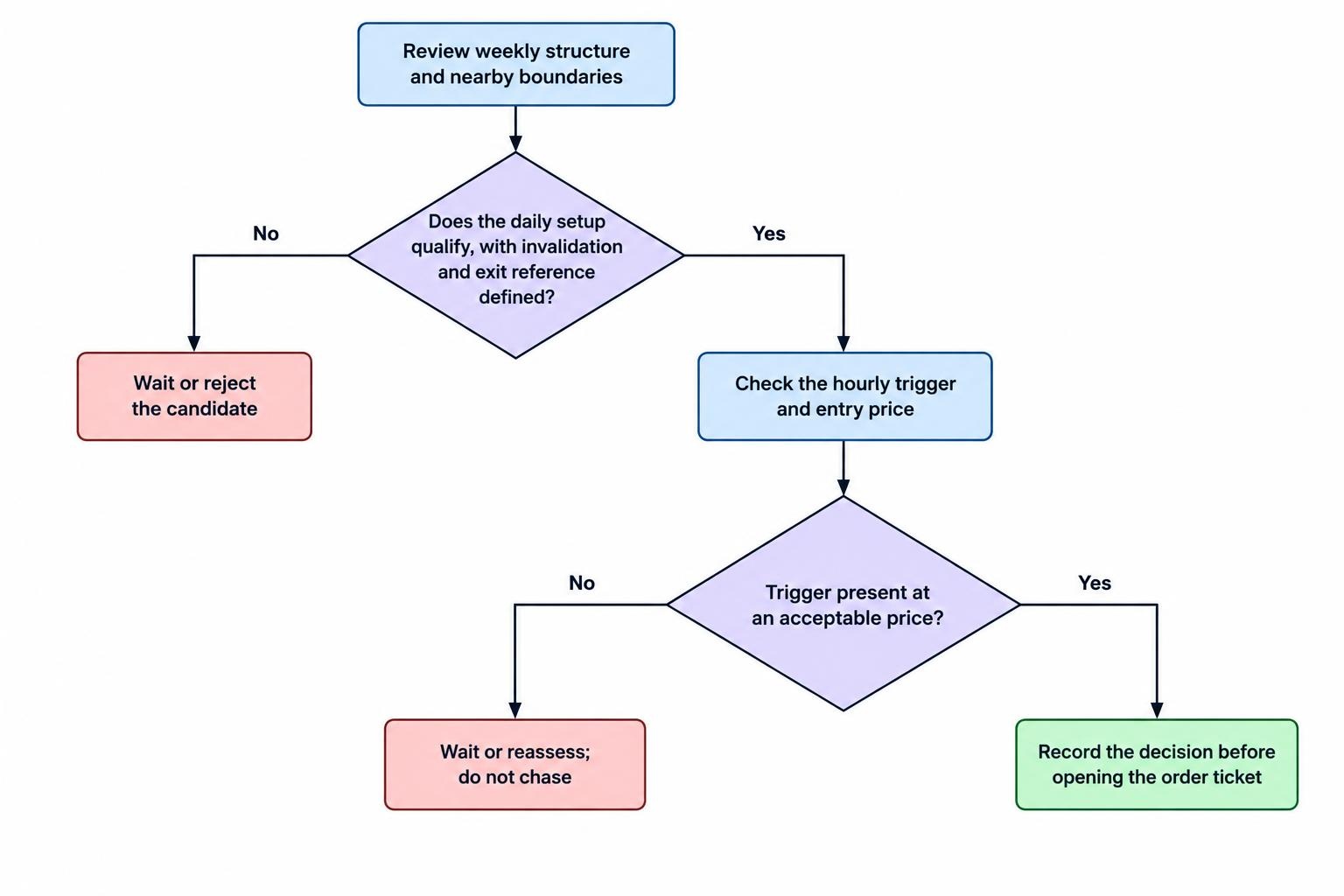
Use a short sequence for each candidate:
- Review weekly structure and mark nearby boundaries.
- Define the daily setup, invalidation and exit reference.
- Check the hourly trigger only if the daily conditions qualify.
- Record the decision before opening the order ticket.
Keep chart settings consistent between reviews. Check the instrument, data status, session selection and displayed timestamps before comparing candles across apps. Do not treat two charts as interchangeable until you have checked what each displays.
Set notifications around the levels that require a decision, rather than every minor movement. A support-zone alert means “review the setup,” not “buy now.” The practical setup is covered in setting price alerts for mobile swing trading.
Keep Indicators Subordinate to the Chart Hierarchy
Start with price structure and marked zones. Add an indicator only if it answers a defined question. A moving average might serve as a trend filter, for example, but decide its role before using it to approve or reject trades.
A 20-period moving average uses 20 bars of the selected interval. On a daily chart, those are daily bars; on an hourly chart, they are hourly bars. Matching the setting across timeframes does not make the indicators equivalent.
For a testable mobile template, use the same chart style and a small, fixed indicator set. Avoid adding a new oscillator whenever the existing chart disagrees with your preferred direction. The screen is already small; it does not need a committee.
Manage the Trade on the Timeframe You Planned
After entry, separate monitoring from management. You can check the hourly chart without letting every hourly fluctuation change a trade built around daily structure. Write down which chart governs exits and stop adjustments before the position is open.
If the trade was planned around daily closes, an unfinished hourly candle should not become an improvised exit rule. Nor should the weekly trend become an excuse to ignore a breached daily invalidation point. Changing the holding period to avoid accepting a loss is not multiple timeframe analysis.
Chart structure also does not replace checks for scheduled announcements or exposure between sessions. Those decisions belong in a separate plan for managing overnight swing trading positions on mobile.
Save screenshots of the context, setup and entry charts with a brief note explaining the decision. During review, ask whether the lower timeframe improved execution or simply encouraged extra trades. Retain the intervals that serve a clear purpose. The aim is not to watch more candles; it is to make the same decision process repeatable.