Avoiding late entries when day trading on mobile starts with a firm boundary: decide where a trade stops being worth taking before the entry signal appears. Once price moves beyond that boundary, a faster tap does not repair the trade.
The aim is not to enter every move early. It is to enter only while the planned setup, potential reward and acceptable risk still line up. A missed trade costs no trading capital. Chasing one can.
Use the process below to separate valid confirmation from hesitation, prepare your phone before a setup develops, and reject entries that have become too expensive. The share prices and thresholds are hypothetical examples, not trading recommendations.
Define “Late” by the Trade, Not the Clock
An entry is late when it no longer meets the conditions that justified the original trade. That might mean price has travelled beyond your entry zone, the target is now too close, or the event you planned to trade has already passed.
Seconds alone are a poor measure. Entering ten seconds after a trigger could still fit a slower setup. Entering one second after a sharp price jump could put you outside your acceptable range. Measure the change in the opportunity, rather than how quickly you reacted.
Write down three boundaries before placing an order:
- Price boundary: the highest acceptable buying price, or lowest acceptable selling price for a short entry.
- Setup boundary: the market condition that must remain true, such as a breakout holding above a marked level.
- Time boundary: when an unfilled entry idea expires and needs a fresh assessment.
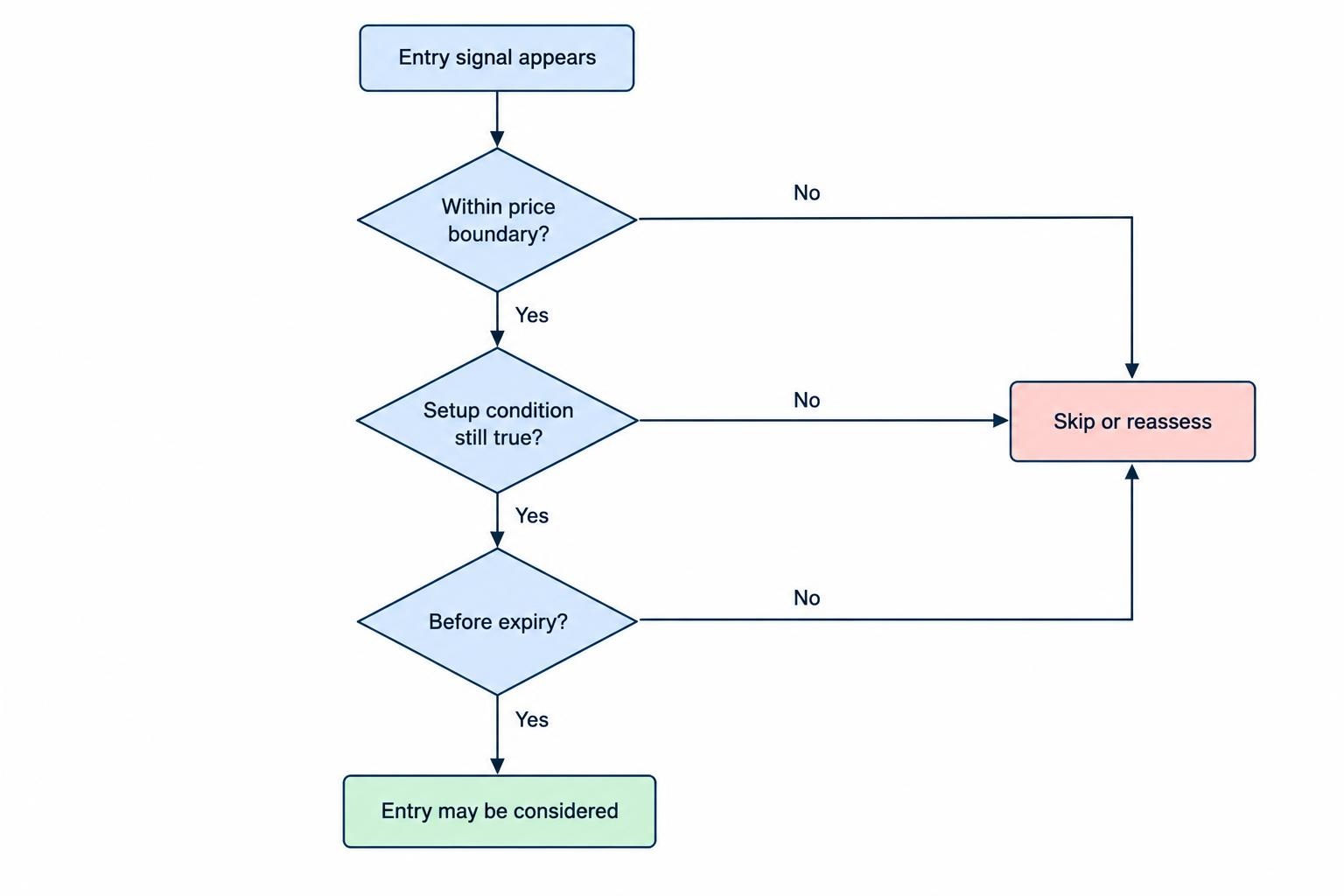
These boundaries belong in your mobile day trading routine. Decide them during preparation, not while a candle races across the screen and your thumb starts negotiating.
Calculate What a Worse Entry Does to the Trade
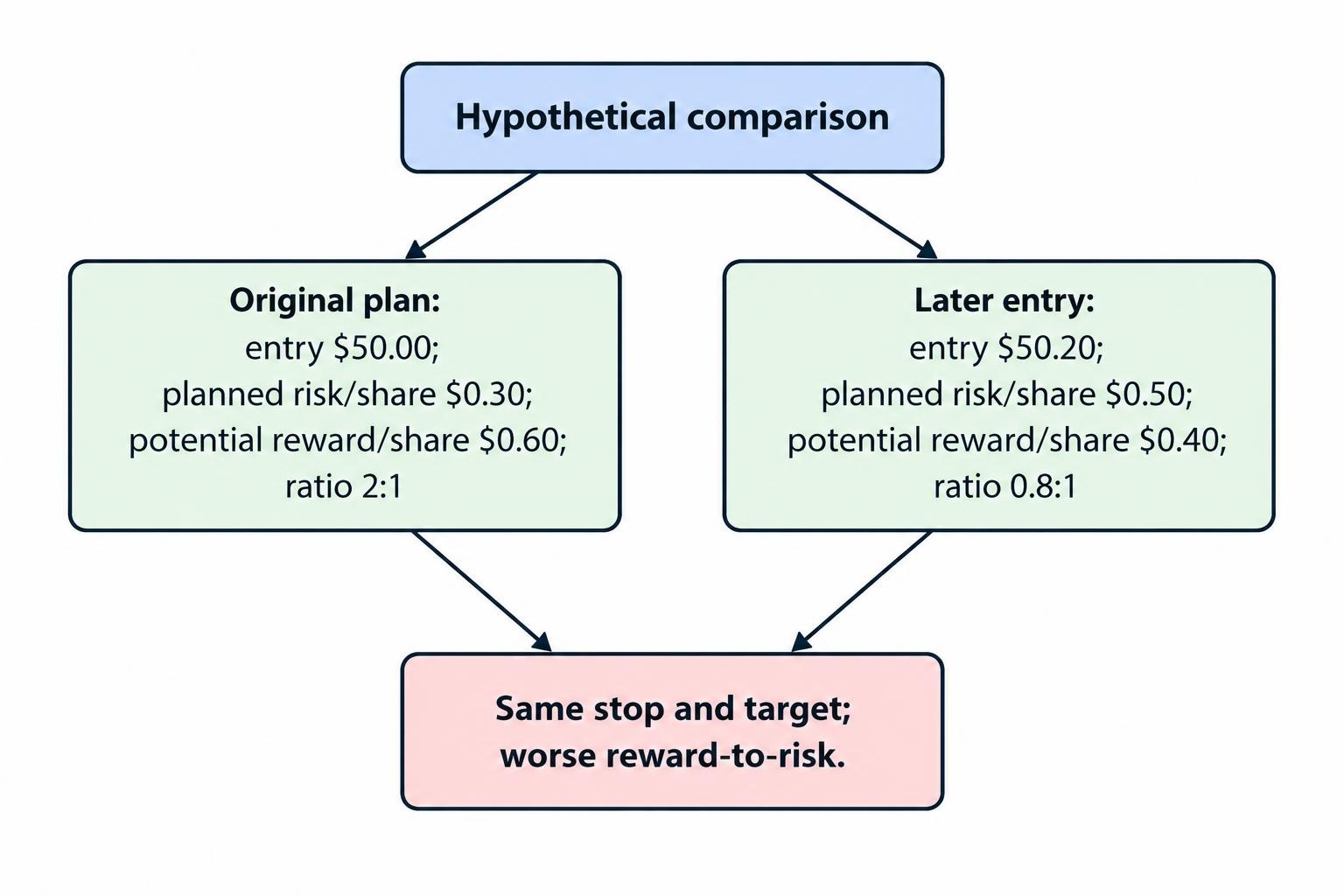
Suppose a hypothetical stock setup has a planned entry of $50.00, an invalidation level at $49.70 and a target at $50.60. Before fees and execution differences, that leaves $0.30 of planned risk per share and $0.60 of potential reward: a 2:1 reward to risk ratio.
You notice the signal late. The available entry is now $50.20. If the original stop and target remain appropriate, the arithmetic changes:
| Entry scenario | Entry price | Planned risk per share | Potential reward per share | Reward to risk |
|---|---|---|---|---|
| Original plan | $50.00 | $0.30 | $0.60 | 2:1 |
| Later entry | $50.20 | $0.50 | $0.40 | 0.8:1 |
The market moved only $0.20, but the planned trade changed substantially. Buying fewer shares could reduce the dollar exposure; it would not restore the original reward to risk ratio.
Do not move the target farther away just to make the calculation look better. Nor should you pull the stop closer unless the setup gives you a valid reason. Changing both numbers to justify a late entry is accounting, not analysis.
Turn the calculation into a maximum entry price
For a long trade, let the target be T, the planned stop be S and your required reward to risk ratio be R. Ignoring costs, the highest acceptable entry is:
Maximum entry price = (T + R × S) ÷ (1 + R)
Using the same target and stop, a required ratio of 1.5:1 gives a maximum entry of $50.06. Above that price, the trade fails that rule even if the chart still looks appealing. This is an arithmetic filter, not evidence that the strategy will be profitable.
Allow for fees, spread and possible execution differences rather than spending the entire margin on the entry price. The intended stop price is also not a guaranteed exit price.
Separate Decision Delay from Execution Delay
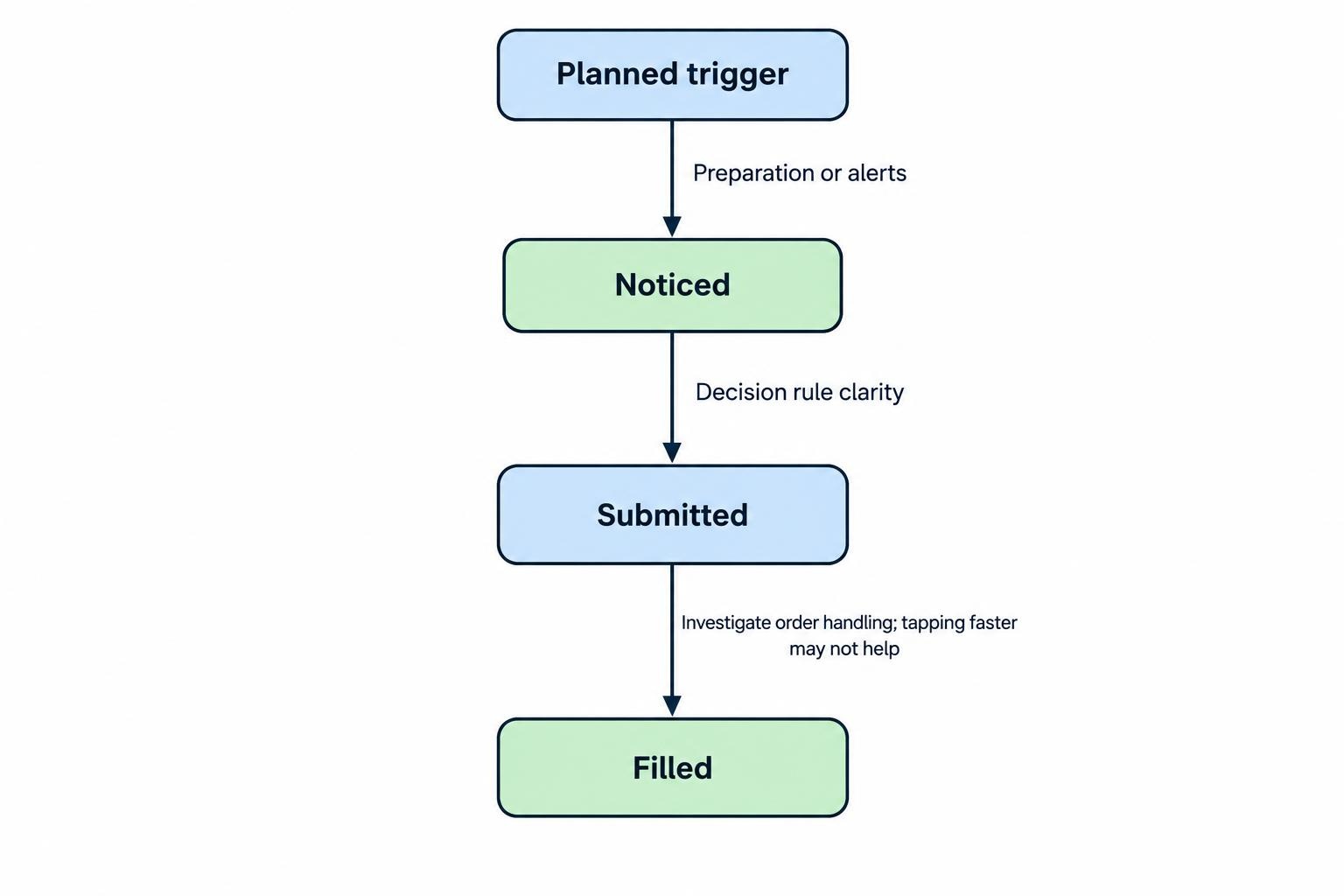
Before changing your setup, identify where the delay happens. Use four timestamps where your tools make them available: the planned trigger, when you noticed it, when you submitted the order and when the order filled.
A long gap before noticing the trigger calls for better preparation or alerts. A long gap between noticing and submitting calls for a clearer decision rule. A gap after submission needs a different investigation; tapping faster would not have fixed it.
For stock orders, submission is not an instant connection to an exchange. The order passes through the brokerage firm, and the available price can change before execution. A displayed quote therefore need not be your eventual fill price; the SEC’s explanation of trade execution covers that distinction.
Use this split when reviewing mistakes. “The app was slow” is not a useful diagnosis if most of the delay happened while you switched between charts, searched for the symbol and reconsidered the trade.
Prepare the Phone Before Price Reaches the Trigger
Build the session around a small enough watchlist to monitor properly. Choose the instruments and setups you intend to trade, then mark the relevant levels before they become urgent.
For each candidate, keep a short entry note: trigger, acceptable entry range, invalidation level, target and expiry condition. If you need several paragraphs to explain the entry, simplify the decision before trying to execute it on a phone.
Arrange the chart and order ticket so you can check the symbol, direction, quantity and price without hunting through menus. Rehearse the path in a practice environment, including how to view working orders and cancel an unwanted entry. Do not remove useful confirmation checks just to save a tap.
Before the session, check that the displayed instrument, session and quote timestamp match what you intend to trade. If you cannot establish whether the information is current, treat that as a reason not to submit a timing-sensitive entry.
Give technical faults their own process. Use the trading app connection troubleshooting guide when data stops updating or order status becomes unclear. Do not use a live entry to test whether the connection has recovered.
Use Alerts to Prepare, Not to Authorise a Trade
Set a preparation alert before price reaches the actual decision level. Its job is to give you time to open the app, review the setup and inspect the order ticket without rushing.
A second alert can mark the trigger area. Neither alert should mean “buy now” or “sell now.” On opening the app, reassess the current price against your entry boundary. Do not trade the price printed in an earlier notification.
Choose alert distance around the setup rather than copying a fixed amount across instruments. A preparation alert should leave enough room for your normal review process. If it repeatedly arrives too late to be useful, move it earlier or stop using that setup for mobile execution.
Also make attention part of the entry rule. If an alert arrives while you cannot safely review and manage a position, skip the trade. Being able to reach the buy button is not the same as being available to trade.
Match the Order to Your Price Boundary
An order type should enforce the decision you already made. It should not become a last-minute attempt to catch anything that moves.
For stocks, a market order does not guarantee its execution price. A buy limit order sets the highest price you will pay, but execution is not guaranteed. Those are different trade-offs, not interchangeable ways to get the same result; see the SEC investor bulletin on market and limit orders.
If your hypothetical maximum entry is $50.06, repeatedly raising a buy limit from $50.06 to $50.10 and then $50.20 defeats the boundary. The order still has a limit, but your process no longer does.
Conditional entries need an expiry rule
For stocks, a stop order becomes a market order when triggered, so the stop price does not guarantee the fill price. A stop-limit order adds a price restriction but can remain unfilled. Trigger standards can also differ between firms, as covered in the SEC bulletin on stop and stop-limit orders.
Before using a conditional entry, check the platform’s trigger method, eligible trading session and order duration. Define when you will cancel it if the setup changes. An entry order left working after its rationale disappears is not preparation; it is an unattended decision.
Keep the mechanics separate from the timing rule. The guide to mobile trading order types covers the broader choices. Here, the question is narrower: does this order preserve your acceptable entry price and remain valid only while the setup exists?
Distinguish Confirmation from Hesitation
Waiting is not automatically a mistake. If your strategy requires a candle close, a retest or another defined condition, entering before it appears would break the plan. A later timestamp can still be the correct entry.
The problem starts when the required confirmation appears and you keep adding new conditions. You check another indicator, open another timeframe, then wait for one more candle. By the time you feel comfortable, the acceptable entry has gone.
Write the confirmation rule in language that produces a clear decision. “Enter after the five-minute candle closes above the marked level, provided price remains within the entry zone” is more usable than “enter when the breakout looks strong.” Neither wording establishes a profitable strategy, but only one gives you a rule you can review.
If hesitation repeatedly pushes you beyond the entry boundary, practise recognising the setup without placing money at risk. Do not solve uncertainty by forcing a faster live decision.
Have a Procedure for Missed Moves
When price leaves the acceptable entry zone, close or reset the unused ticket and label the original opportunity missed. That small action separates observation from an order you are still tempted to send.
A pullback may create another opportunity, but require it to qualify as a new setup. Reassess its trigger, stop, target and entry range. A return to your preferred price alone is not enough if the reason for the original trade has disappeared.
Avoid increasing size to compensate for the move you missed. There is nothing to recover: you did not own that profit. Equally, do not judge the decision to skip by whether price continued rising afterwards. Judge it by whether the available entry met your rules.
If order status is unclear, verify before acting again
Do not send another order simply because the first submission appears slow. Check working orders, fills and positions through the firm’s available account tools, and contact support if status remains uncertain. A cancellation request also needs confirmation; it is not proof that the original order was cancelled. The SEC’s guidance on uncertain orders and cancellations addresses the risk of accidentally trading twice.
Review Entry Quality Without Rewarding Bad Habits
Keep the planned entry, maximum acceptable entry, actual fill and reason for any delay in your phone-based trading journal. Where possible, save the chart as it appeared at the decision point, rather than relying only on a later view.
Separate compliant entries, chased entries and correctly skipped trades. Review whether the rule was followed before looking at profit or loss. A profitable chase still broke the process; a losing trade taken within the plan is not automatically an entry mistake.
Then change the part you can identify. Prepare earlier if you notice triggers late. Simplify the review if you hesitate after confirmation. Investigate order handling if submission-to-fill delays are the issue. If a setup consistently demands more speed than you can reliably provide on mobile, leave it out of your mobile session.
The practical standard is straightforward: prepare before the trigger, check the trade at the available price, and stop once it falls outside your boundary. You do not need to catch every move. You need a repeatable reason for the ones you enter.