Getting started with mobile trading means more than downloading an app and adding money. You need an account that matches what you intend to trade, a secure phone, a clear view of costs and enough practice to recognise what happens after you tap Buy or Sell.
The sensible starting point is a small, repeatable process: choose one market, check the provider, learn the order screen and practise before committing money. Your first objective is operational competence, not a winning streak. You should be able to explain what you own, how much money is exposed and how you would close the position if the app stopped working.
Decide What You Want to Use Mobile Trading For
Start with the task, not the app store rankings. Buying investments to hold for several years is different from opening and closing trades during a lunch break. Both can happen on a phone, but they require different research, monitoring and decision making.
Write down the market you want to use, your expected holding period and when you can realistically check the account. “Buy shares and review them weekly” is a workable brief. “Trade whatever is moving whenever I have a spare minute” is not much of a plan.
Keep your initial setup narrow. Choose one market and learn its trading hours, price units and product terms before adding more. Check whether the product gives you ownership of an asset or exposure through a contract. Two instruments with similar names can create very different obligations.
Also separate trading money from money needed for bills, emergencies or near term commitments. If losing the proposed deposit would disrupt ordinary spending, reduce the amount or stay with practice trading. An app’s minimum deposit is a payment threshold, not a recommendation for your finances.
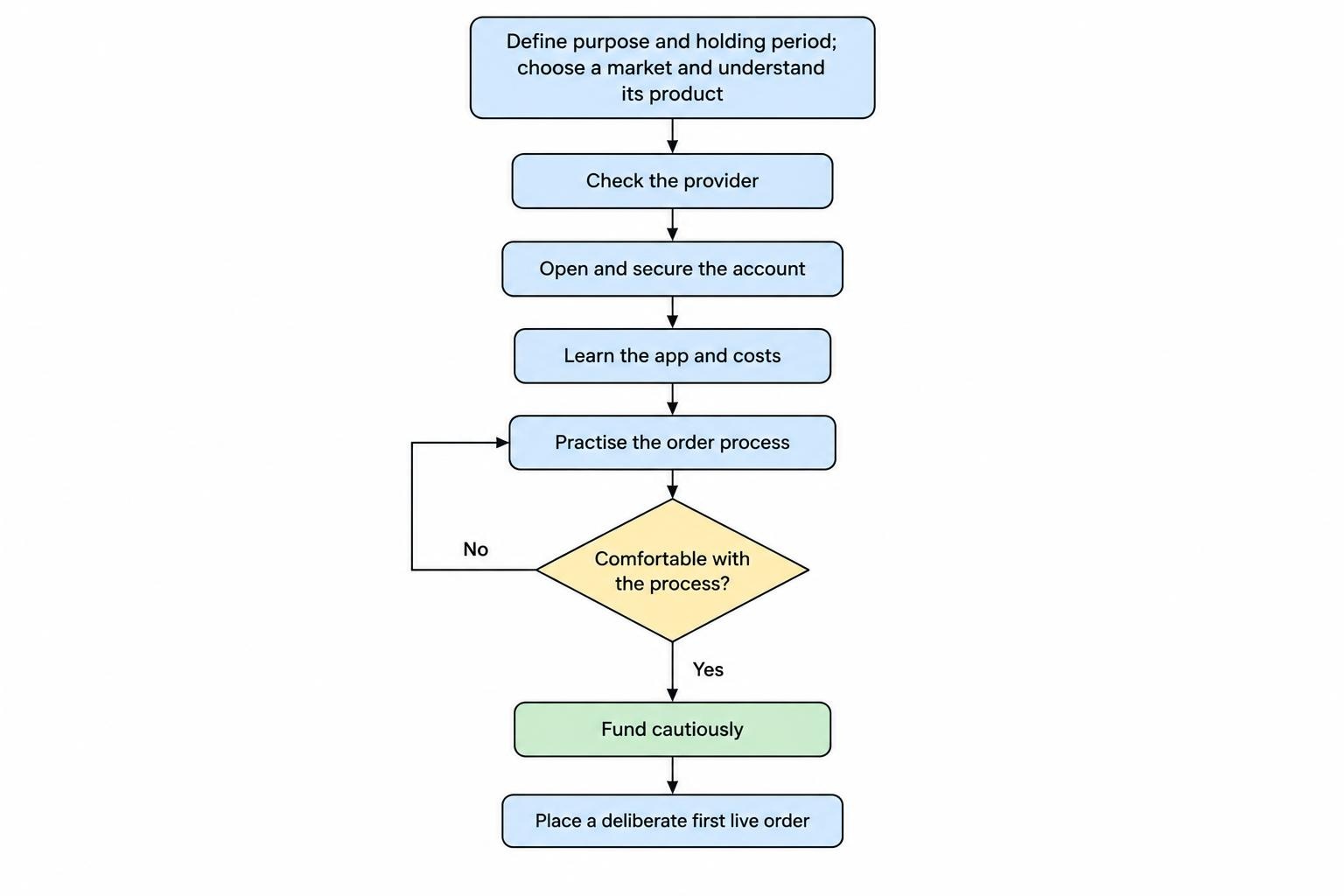
Check the Provider Before Installing Its App
Identify the legal company that will hold your account. A brand name, app icon and operating company are not necessarily the same thing. Read the account agreement and confirm which entity serves residents of your country.
For a US securities brokerage, use FINRA’s BrokerCheck registration and disciplinary search to research the firm. Match its legal name and registration details rather than relying on a familiar logo. This check concerns the business behind the account, not whether an investment will perform well.
Then assess the app against your intended use. Can you find order history easily? Does the order preview show the estimated transaction value? Can you download statements and contact support without hunting through menus? A polished chart is useful, but account records and dependable controls deserve more attention.
Use the provider’s verified official download route and check the app publisher before signing in. Avoid installation links sent through unsolicited messages. For a fuller selection process, use the guide to choosing a broker for mobile trading; this onboarding process assumes you have already narrowed the choice to a suitable provider.
Open the Account and Review Its Permissions
Prepare your identification and financial details before starting the application. US brokerage applications commonly request a Social Security number or other taxpayer identification number, address, date of birth, employment details, investment experience and financial information. The SEC’s brokerage account opening bulletin sets out the information applicants may need.
Enter accurate answers, particularly about experience and your ability to tolerate losses. Do not inflate your knowledge to gain access to products. An approval screen is not evidence that a product suits your circumstances.
Check Whether You Are Opening a Cash or Margin Account
For securities, a cash account requires you to pay for purchases in full. A margin account allows borrowing from the brokerage, which introduces debt and interest costs. The SEC’s account opening guidance distinguishes these account types and warns about the risks of borrowing to buy securities.
If your intended activity does not require borrowing, consider whether a cash account meets your needs. Confirm the selection before submitting the application. Review optional permissions too, rather than enabling every available feature because the button is there.
Save the account agreement, fee schedule and support details somewhere accessible outside the trading app. You should not have to log into a malfunctioning app to find out how to contact its operator.
Secure Your Phone and Account Before Funding
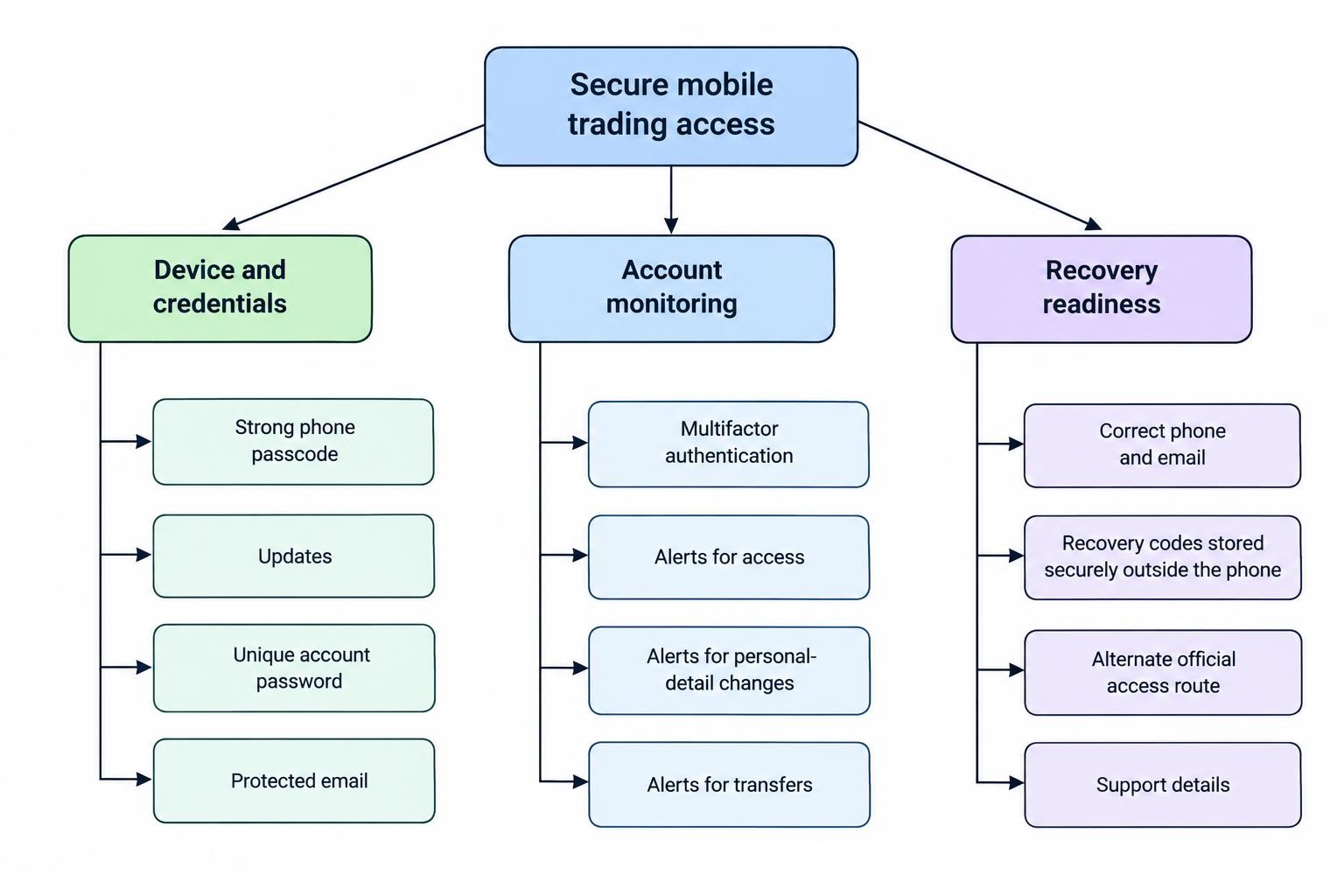
Set a strong phone passcode, keep the operating system and trading app updated, and use a different password for your trading account than for other services. Protect the email account connected to it as well, since that address may receive account notices and recovery messages.
Enable multifactor authentication where available. Turn on alerts for account access, changes to personal details and money transfers, rather than enabling price alerts alone. These safeguards form part of the SEC’s guidance on protecting online investment accounts.
Before depositing, check your recovery arrangements. Confirm that the registered phone number and email address are correct, and store any recovery codes securely outside the phone. Biometric sign in is convenient, but you still need to know how access works when your device is lost or replaced.
Make the first setup session unhurried. Account security is a poor task to squeeze between a train announcement and a low battery warning.
Learn the App Without Placing a Trade
Spend a session finding the account controls before studying indicators. Locate balances, positions, open orders, completed transactions, statements and support. Learn how to switch between practice and live accounts, if both are available, and check the account label every time.
The following checks are worth completing before any live order:
| App area | What to check | Mistake to prevent |
|---|---|---|
| Instrument page | Name, symbol, exchange, currency and product type | Selecting a similarly named but different instrument |
| Order ticket | Buy or sell, quantity units, price controls and duration | Entering dollars where the app expects shares or contracts |
| Account balances | Cash, buying power and withdrawal availability | Treating every displayed balance as spendable cash |
| Orders and positions | Where pending orders and completed trades appear | Mistaking a submitted order for an existing holding |
| Documents and support | Confirmation records, statements and contact routes | Having no accessible record when something goes wrong |
Read the help text beside unfamiliar balances. Do not assume that buying power, account value and money available to withdraw mean the same thing.
Next, price a hypothetical transaction using the published fee schedule. Check the purchase, eventual sale and any currency conversion or account charges that would apply. Work through mobile trading fees and costs before comparing providers on a headline commission alone.
Practise the Complete Order Process
If a demo account is available, use it to rehearse actions rather than chase a large virtual balance. Find an instrument, prepare an order, review it, submit it, inspect the result and close the practice position. Also practise cancelling an unfilled order.
Use a practice balance and position sizes that resemble what you could realistically afford. A simulated account worth hundreds of thousands of dollars teaches little about managing a modest live deposit if every trade uses an unrealistic amount.
Practise doing nothing too. Open an order ticket, identify a reason not to proceed and exit without submitting. The ability to stop at the review screen matters more than speed.
Do not treat demo profit as proof of readiness for larger live trades. Practice is useful for learning controls, but it cannot establish how you will react to a real loss or guarantee the same execution conditions.
Before moving on, learn the distinction between market, limit and stop orders. A market order does not fix the execution price; a limit order controls the acceptable price but may remain unfilled. Use the mobile trading order types guide to choose deliberately rather than accepting whichever setting appears first.
Fund the Account Without Rushing Into a Position
Once the account is approved and secured, review its funding instructions. Confirm the destination, accepted payment methods, account currency and any charges. Where practical, begin with a modest transfer to check the process rather than sending your entire intended balance immediately.
Read the provider’s distinctions between a deposit being received, becoming available to trade and becoming available to withdraw. Check these terms directly instead of assuming that a visible balance means every action is permitted.
Keep the transfer confirmation and reconcile it against the account record. If the details do not match, resolve the discrepancy before placing an order. The guide to deposits and withdrawals through trading apps covers this part of the process in more detail.
Funding creates no obligation to trade. Leaving the money untouched while you finish checking the app is a valid decision.
Place Your First Live Order Deliberately
Choose a time when you can give the order your full attention. Avoid multitasking, unreliable reception and situations where you may need to put the phone away immediately. The first live transaction should test your process at a manageable size, not test your nerve.
- Confirm the account. Check that you are in the intended live account and using the correct currency.
- Confirm the instrument. Read the full name, symbol and product description.
- Check the quantity. Establish whether the entry field expects money, shares, units or contracts.
- Set the order terms. Review direction, order type, price conditions and expiry.
- Read the preview. Check estimated value and displayed charges before submitting once.
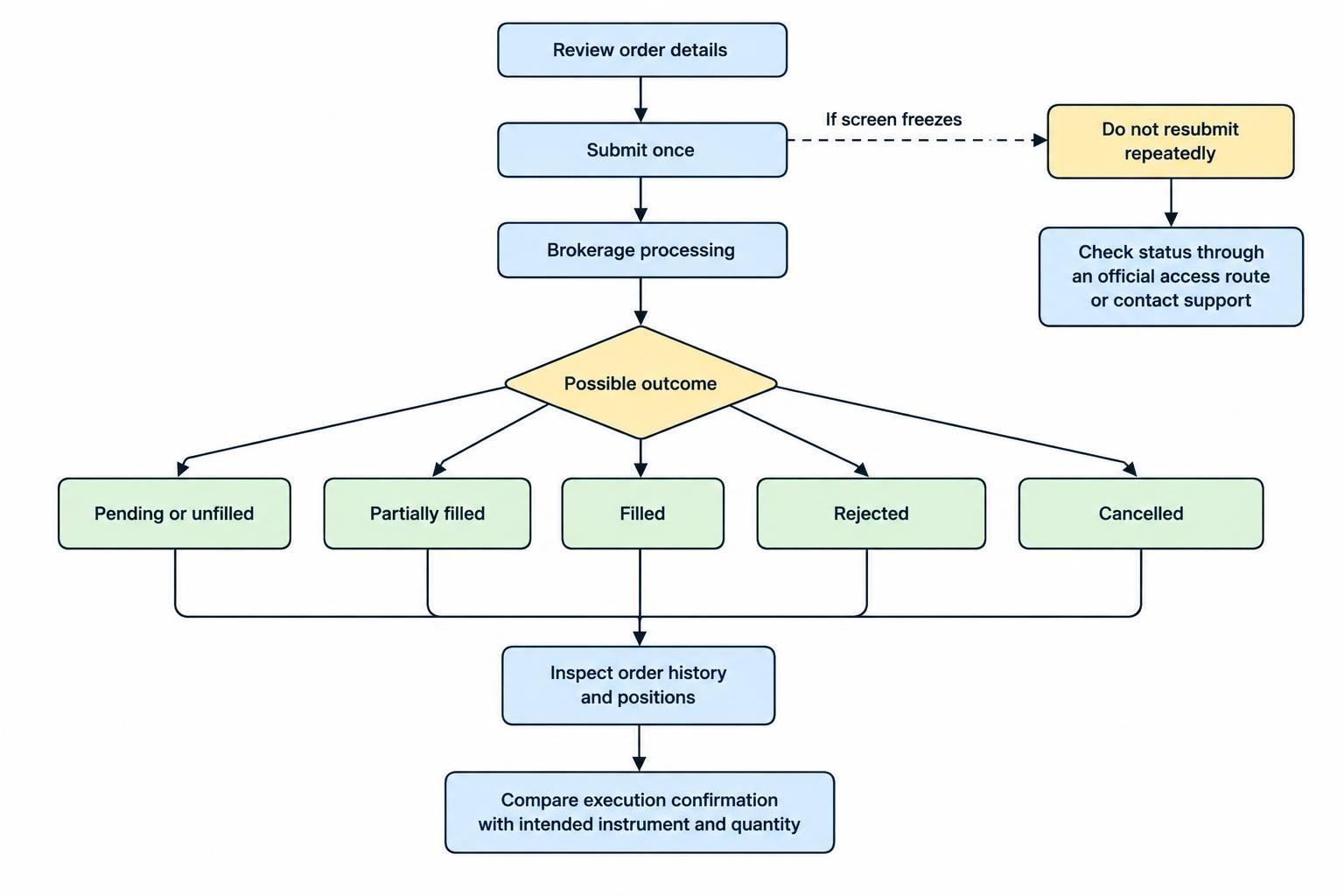
- Inspect the status. Find out whether the order is pending, partially filled, filled, rejected or cancelled.
A submitted stock order goes to the brokerage for processing and execution; it does not become a completed trade simply because you tapped the button. Orders can fill partially or remain unfilled. FINRA’s explanation of the online stock trade lifecycle describes that sequence and the confirmation that follows execution.
If the screen freezes, do not repeatedly submit the same order. Check order history and positions first, using another official access route or contacting support if necessary. Record the order reference when available. Guessing whether an order went through is not a trading strategy.
Set Your Loss and Connection Rules in Advance
Before opening a position, write down why you are entering, what would invalidate the decision and how you intend to exit. Set an amount you are prepared to risk, while recognising that an intended exit price is not a guaranteed result.
Keep position value separate from planned loss. Buying $300 of shares commits $300 to the holding; planning to sell after a $15 decline does not make $15 the maximum possible loss. Price gaps and execution conditions can disrupt an exit plan. Build these decisions into your mobile trading risk management process before increasing trade size.
Prepare for loss of access as well. Save the official support number, confirm whether another device or browser can access the account, and know where to check order status. Review trading app connection troubleshooting before an outage makes the reading urgent.
After the first transaction, compare your intention with the confirmation: instrument, quantity, execution price and charges. Save the records for reconciliation and tax reporting. Increase activity only when you can repeat the process without confusion. A useful mobile trading setup makes deliberate decisions easier; it does not need to make trading more frequent.