A fake trading app can look convincing long before it asks for money. The useful checks are not whether its charts move smoothly or its logo looks familiar, but whether you can independently verify the operator, the download route and the destination of your deposit.
Before installing an unfamiliar app, stop following the promoter’s links. Check the business through the relevant regulator, contact the genuine firm independently and confirm that it actually offers that app. If you have already deposited money and someone demands another payment to release it, stop sending funds while you investigate.
This guide focuses on identifying impersonation and investment fraud. For the wider protection of a legitimate account, use our guide to mobile trading app security.
What Makes a Trading App Fake?
A fake trading app misrepresents who operates it, what happens to your money or whether the displayed investments exist. It may imitate a registered broker, invent a trading business or provide an account screen that bears no relation to real holdings.
Fraud does not always require malicious software. A functioning app can be the front end of a dishonest investment operation. Equally, a familiar name on the screen does not establish that the real business controls it. The SEC’s warning about relationship investment scams covers fabricated trading information and explains that availability in a well-known app store does not establish legitimacy.
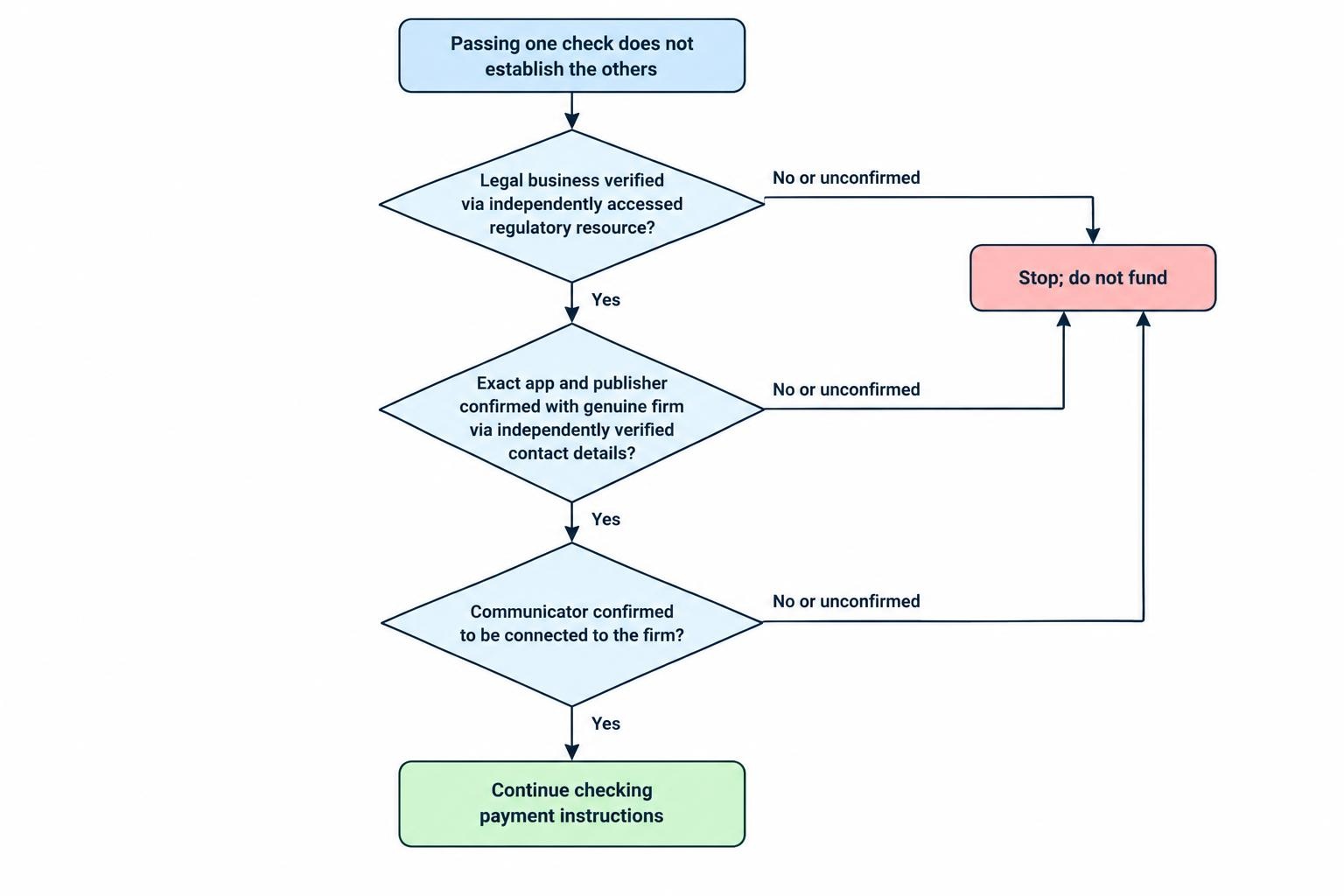
Separate three questions: Is the business genuine? Does this app belong to it? Are you communicating with its actual staff? A satisfactory answer to one does not settle the others.
Verify the Operator Before Checking the App
Find the Legal Business Name
Start with the legal entity named in the customer agreement, account opening documents and payment instructions. Do not stop at the brand name shown beneath the app icon.
Write down the entity name, claimed regulator, registration number, website address and contact details. Then compare those details through an independently accessed regulatory resource. For a US securities firm or investment professional, use the registration checks available through Investor.gov, FINRA BrokerCheck or the SEC’s Investment Adviser Public Disclosure database, as appropriate.
A matching registration number is not enough. Criminals can copy a real professional’s name and credentials. Confirm the relationship using independently verified contact details, such as those in the firm’s genuine Form CRS, rather than the number supplied in a message. The SEC alert on broker and adviser impersonation sets out this verification process.
Ask the Genuine Firm to Confirm the App
Use that independent contact route to ask whether the firm operates the app, recognizes its publisher and sent the invitation you received. Give the exact app name and listing address rather than asking vaguely whether the firm “has an app.”
A useful question is: “Does your firm operate this exact app, and is this the correct download listing?” If a promoter discourages you from contacting the business, end the conversation until you can verify it.
Do not accept a company incorporation certificate as a substitute for checking financial authorization. Keep the broader assessment of products, account terms and customer protections separate; our guide to choosing a broker for mobile trading covers that decision.
Inspect the Download Route and Publisher
Once you have established the firm’s genuine contact route, use its confirmed app listing. Avoid choosing between similar names in search results or treating a download button in a group chat as verification.
Compare the publisher name, support address and privacy policy destination with the operator you checked. A publisher may use a legal company name rather than the trading brand, so a difference deserves investigation rather than an automatic accusation.
Warning signs include unexplained additions such as “Pro” or “Global,” repeated app name changes, a developer name that does not match the claimed firm, and a small collection of almost perfect reviews. These appear in FINRA’s guidance on imposter investment apps, alongside warnings about paid announcements that resemble independent news coverage.
Read reviews to find questions worth investigating, not to obtain a safety certificate. Look for recurring descriptions of withdrawal demands, changes of operator or pressure to deposit more. Neither five stars nor an absence of complaints replaces an identity check.
Use a Short Comparison Check
| Check | What to Compare | When to Stop |
|---|---|---|
| Operator | The agreement’s legal entity against independently checked records | The promoter will not identify the entity |
| App listing | The listing against the genuine firm’s confirmation | The firm does not recognize it |
| Contact details | Messages against independently verified firm contacts | You are told not to contact the firm |
| Funding | The recipient against verified account instructions | The recipient is unexplained or keeps changing |
| Withdrawal | The demand against previously disclosed terms | More money is demanded to release existing funds |
Do Not Bypass Security to Install or “Activate” an App
Pause if an adviser asks you to weaken your phone’s protections, ignore a security warning or install additional software before you can trade. Do not let someone talk you through settings changes while rushing you to complete a deposit.
On Android, keep Play Protect enabled. It checks apps for harmful behavior, including apps obtained outside Google Play, and can warn about, disable or remove harmful software. Use Google’s Play Protect instructions to check the protection yourself, rather than following screenshots supplied by a promoter.
A scan is a device security measure, not an investigation into the investment business. Continue checking the operator and funding arrangements even if no warning appears.
For either operating system, refuse requests to disclose your device passcode, email password or authentication codes. Do not approve an unexpected sign-in prompt because someone calls it account activation. Pressure to disable account security is a recognized social engineering tactic in Apple’s guidance on phishing and impersonation scams.
Be cautious about remote support or screen sharing during account setup. If help requires another person to watch you enter financial credentials, stop and contact the genuine provider independently. Convenience is not a good reason to hand over control of the session.
Examine the Investment Pitch and Payment Instructions
Ignore the Crowd and Assess the Offer
Ask what you would think of the proposition without the group chat, screenshots and friendly introduction. Can you explain what you are buying, who holds the assets and how orders are executed? If not, do not deposit while someone fills the gaps with reassurance.
Treat promises of reliably high returns with little risk as a reason to stop, not an invitation to hurry. Ask for written account terms and take time to read them away from the conversation. Avoid making financial decisions while a salesperson waits on a call.
The practical test is whether the offer survives independent checking. “Everyone in the group is doing it” is not an answer to who controls your money.
Trace Where the Deposit Will Go
Before paying, compare the recipient with the funding instructions obtained from the verified firm. If another company receives client payments, ask the genuine operator to explain and confirm that arrangement.
Stop if you are instructed to use an unexplained personal account, conceal the purpose of a transfer or switch recipients after raising questions. Do not let a supposed account manager supply the explanation and the verification of that explanation.
For cryptocurrency transfers, confirm the intended destination through your independently established account route. Do not assume that buying cryptocurrency through a genuine service makes the next transfer safe. The relevant question is who controls the receiving address, not whether the first purchase worked.
Why Profits and Small Withdrawals Do Not Prove Safety
An account balance is something the app displays. It is not, by itself, proof that the operator holds those assets or that you can withdraw them.
Scammers may allow early withdrawals to build confidence before requesting larger deposits. Later, the account may be frozen and further payments demanded for supposed taxes or fees. The FBI’s explanation of investment fraud describes this sequence, including the use of small withdrawals as reassurance.
Consider a hypothetical case: someone deposits $300, sees a gain and successfully withdraws $50. They then consider sending $10,000. That first withdrawal establishes only that $50 was returned on that occasion. It does not establish the operator’s identity, custody arrangements or capacity to return the larger amount.
Do not use a small deposit as a substitute for verification. A test payment still exposes money, and a successful result can encourage a much larger mistake.
Distinguish an Ordinary Delay from an Advance Payment Demand
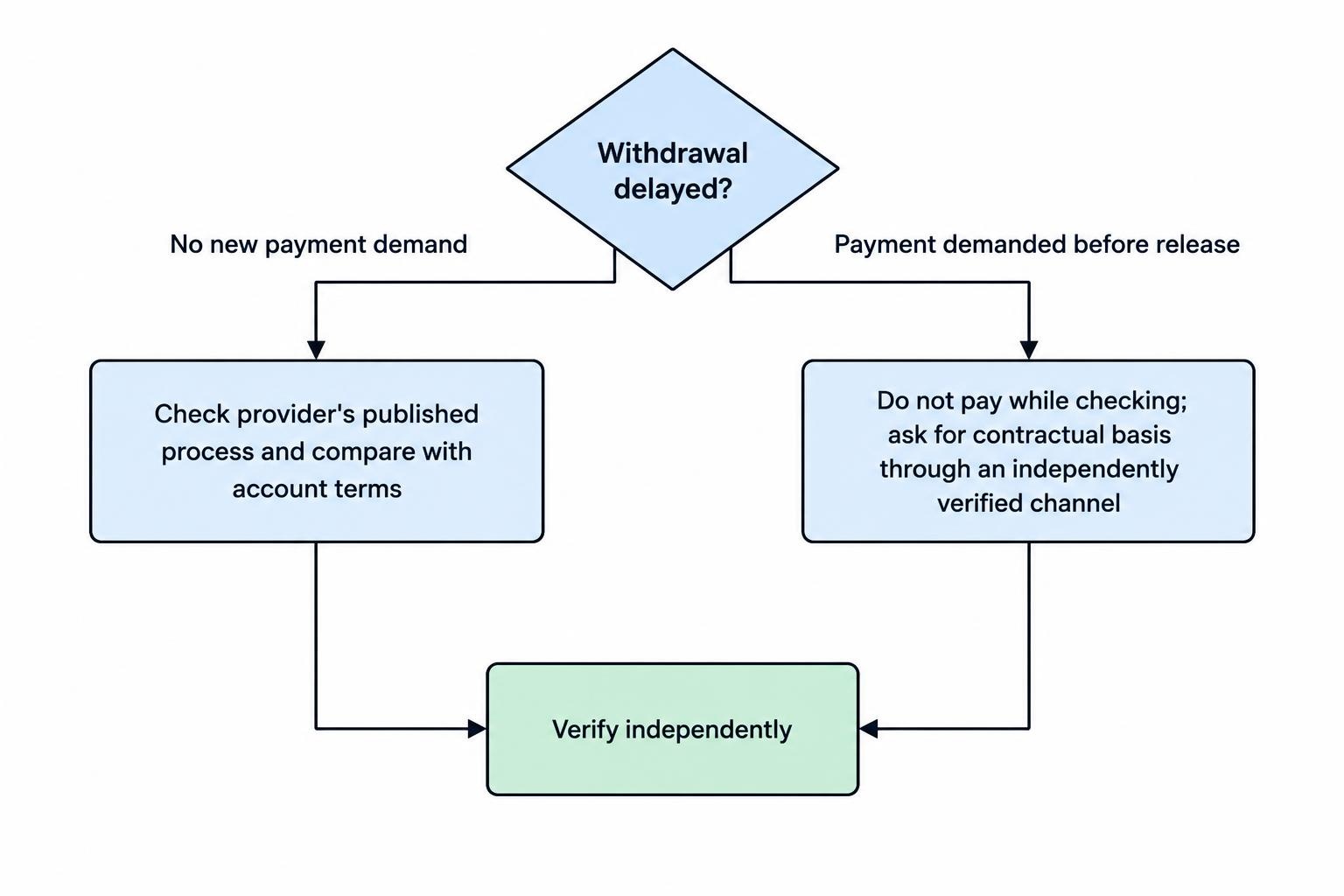
A delayed withdrawal alone does not prove fraud. Investigate it through the genuine provider’s published process and compare the explanation with the account terms.
The more urgent warning is a new demand to send money before existing funds can be released. Labels such as “verification deposit,” “liquidity charge” or “account clearance” do not resolve that concern. Ask for the contractual basis through an independently verified channel, and do not pay while checking.
Keep the displayed profit out of the decision. A large number on the screen can make another payment feel small by comparison; assess the money you would actually lose if you sent it.
What to Do If You Have Installed a Suspicious App
Stop Payments and Secure Exposed Accounts
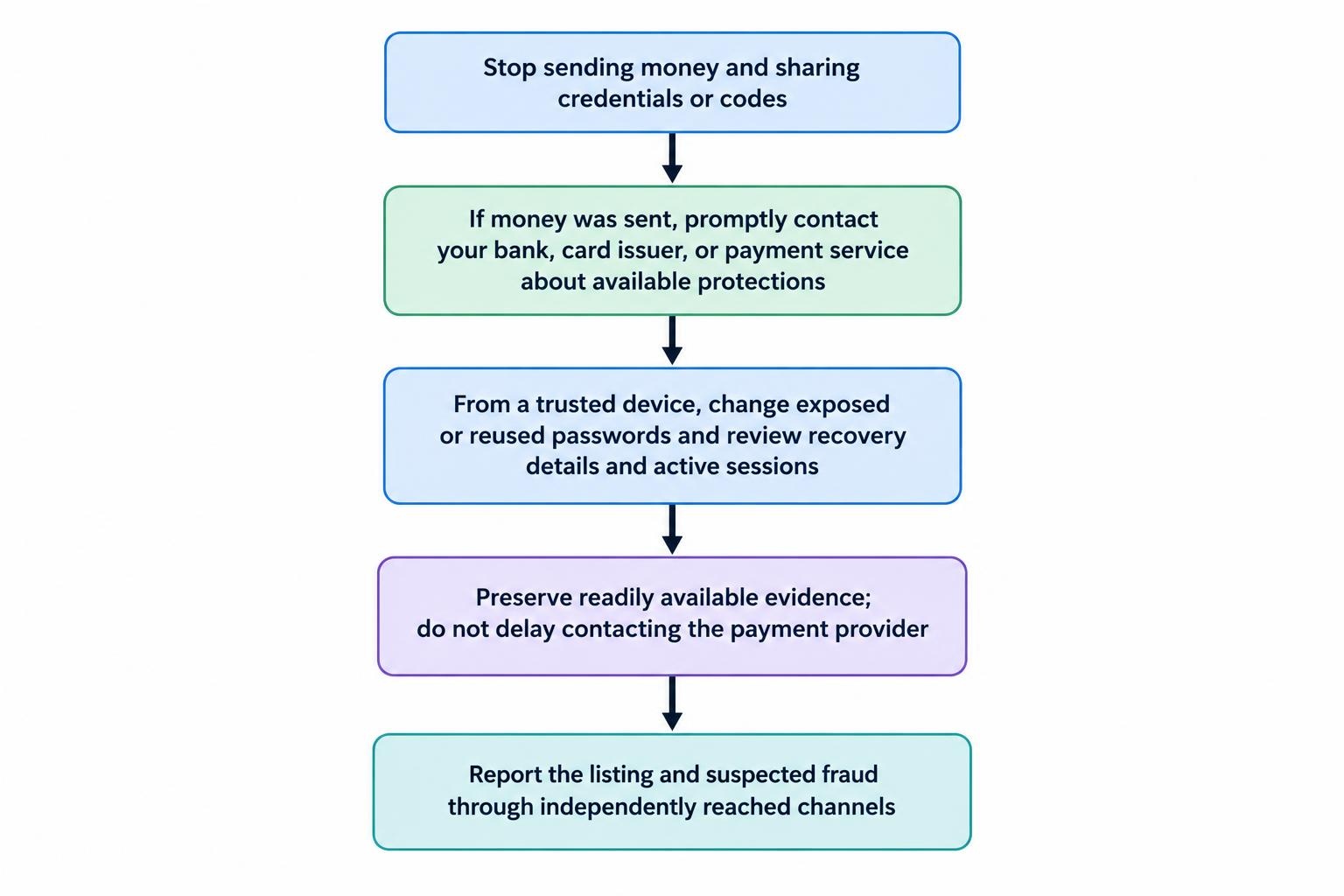
Do not send another deposit to test the app or satisfy a release demand. Stop sharing identity documents, codes and account information with the suspected operator.
If you paid, contact your bank, card issuer or payment service promptly. Describe accurately whether you authorized the transfer after being deceived or whether someone made it without your permission. Ask what recall, dispute or protective measures are available; do not assume recovery is guaranteed.
Change any password you disclosed and change it elsewhere if you reused it. The FTC’s steps after a scam cover contacting payment providers, replacing exposed passwords and responding to access to your device.
Use a device you trust for recovery if you suspect the phone is compromised. Prioritize your email and genuine financial accounts, then review their recovery details and active sessions. Our guide to two-factor authentication and trading account recovery covers restoring access without relying on the suspected operator.
Preserve Evidence Before Removing Access
Where safe, save the app listing, publisher details, website addresses, conversations, payment receipts, wallet addresses and transaction identifiers. Record dates, amounts and the wording of any withdrawal demands.
Do not delay contacting your payment provider to produce a perfect evidence file. Preserve what is readily available, then follow trusted device security guidance to remove suspicious software or permissions. Avoid reopening the app to investigate it yourself.
Report the listing to its app store and notify any genuine firm being impersonated. In the United States, report suspected online investment fraud to the FBI’s Internet Crime Complaint Center and report the scam to the FTC. Keep copies of your submissions.
Do Not Pay a Second Stranger to Recover the Money
After a suspected scam, distrust unsolicited claims that someone has located your funds and can release them for an upfront payment. The SEC’s relationship scam warning also describes follow-up approaches impersonating regulators, law firms or recovery organizations.
Use reporting and support channels you reach independently. Do not share passwords or authentication codes with someone promising recovery, and do not borrow money to meet a new deadline.
The most useful rule is straightforward: verify the operator, confirm the exact app and check the payment destination before funding. If any of those checks fails, stop. A polished interface is not a reason to give an unverified business the benefit of your bank balance.