Mobile options trading lets you review option chains, open positions and manage existing trades from a smartphone or tablet. The convenience is useful, but the smaller screen leaves less room for contract details, pricing data and order checks. A misplaced tap can select the wrong expiration date just as easily as the wrong quantity.
A practical mobile setup should make three things clear before you submit an order: what contract you are trading, how much you could lose, and what happens if the position reaches expiration. This guide focuses on US exchange traded stock and ETF options, with references to index options where their settlement terms matter. It does not cover binary options or options on futures.
How Options Trading Works on a Phone
The device changes the interface, not the contract. A call gives its buyer the right to buy the underlying shares at the strike price; a put gives its buyer the right to sell. Selling an option to open a position creates an obligation rather than that right.
A standard US equity option generally represents 100 shares, so a quoted premium of $1.80 usually means $180 per contract before fees. Adjusted contracts can have different deliverables. Check the contract details rather than treating the multiplier as automatic; the SEC’s introduction to listed stock options covers premiums, contract size and the distinction between buyers and writers.
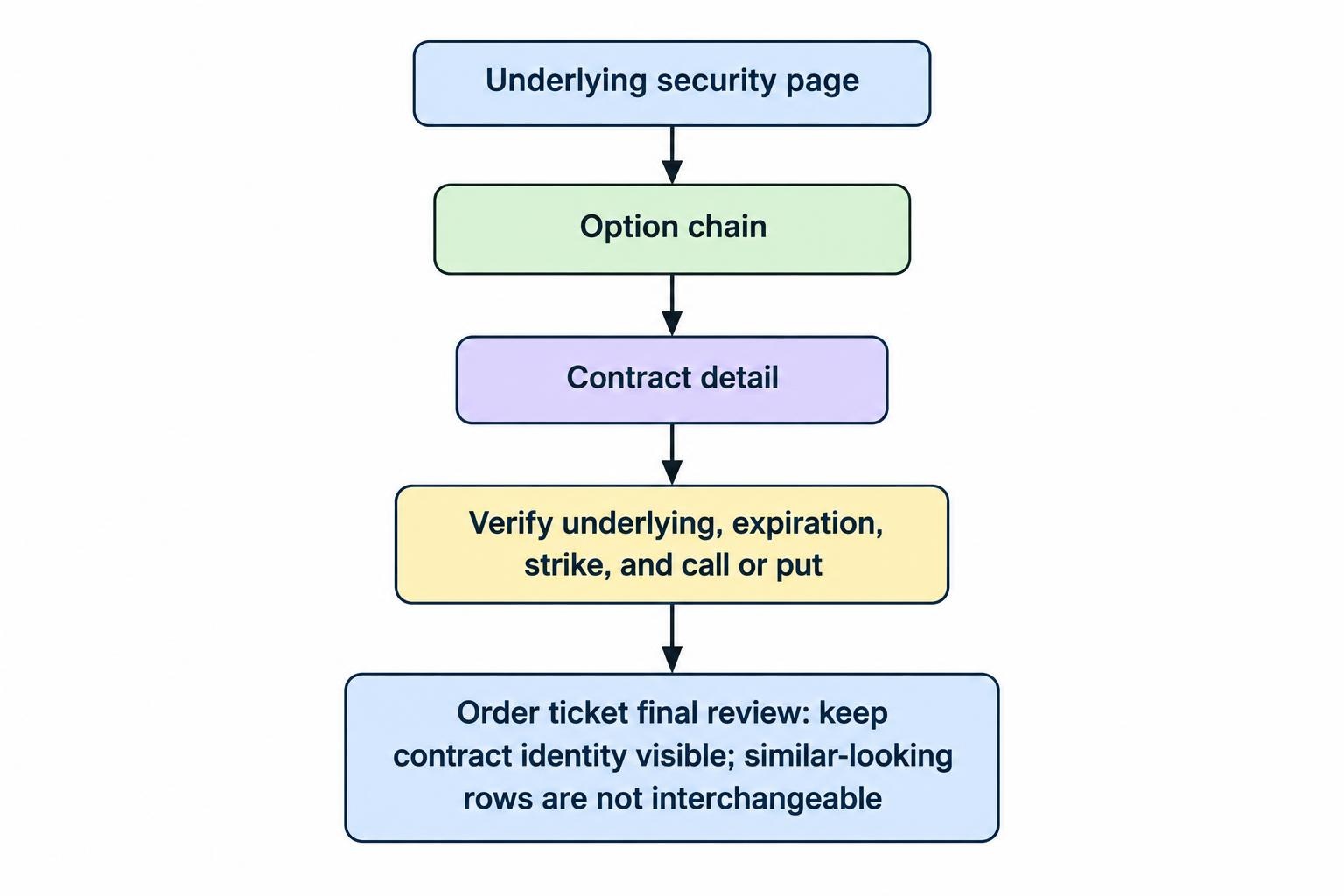
On mobile, the trading process usually moves through an underlying security’s page, an option chain, a contract detail screen and an order ticket. Keep the complete contract identity visible at the final review: underlying symbol, expiration date, strike price and call or put. Similar looking rows are not interchangeable.
Check Options Permissions Before Comparing App Features
Access to share trading does not automatically include options. US brokerage firms must approve customers for options trading before accepting their options orders, with account review requirements set out in FINRA Rule 2360 on options accounts. Approval is not an endorsement of a strategy or evidence that a trade suits your finances.
Ask which strategies your account can use, whether they work in the mobile app, and what collateral they require. Firms may use different names and numbering systems for permission levels. “Level two” tells you little without the accompanying strategy list.
For an options focused comparison, prioritize a readable chain, clear position grouping, access to exercise instructions and reliable order status information. Check whether the app supports closing a spread as one order, not just opening it. Broader checks on account access, service and platform suitability belong in the guide to choosing a broker for mobile trading.
Read the Option Chain Without Losing the Contract Details
A crowded chain can encourage shortcuts. Start by selecting the expiration date deliberately, then compare strikes. Do not choose a contract solely because its premium looks affordable. A cheaper option may require a larger price move, leave less time for your forecast to work, or have an expensive spread.
| Field | What it tells you | Mobile check |
|---|---|---|
| Expiration | Which dated contract you are viewing | Confirm the full date, not just the selected tab |
| Strike and type | The exercise price and whether it is a call or put | Read both again on the review screen |
| Bid and ask | The displayed buying and selling quotes | Check their width and available size |
| Volume and open interest | Trading activity and outstanding contracts | Use as context, not a promise of execution |
| Quote timestamp | How current the displayed information is | Identify delayed or stale data before submitting |
The last traded price is historical, not an offer to transact now. A contract could show a last price of $2.00 while its current bid and ask sit elsewhere. Likewise, the midpoint between bid and ask is a reference price, not a guaranteed fill.
Configure the chain around decisions you actually make. If you cannot see the expiration, strike and quotes together, reduce the displayed columns or open the contract detail screen. More numbers do not help if the important ones disappear off the edge.
Keep Price, Time and Volatility in View
An option can lose value even when the underlying moves in the direction you expected. Time passing and changes in implied volatility can offset a favorable share price move. The Options Industry Council’s explanation of volatility and the Greeks describes these sensitivities as estimates, not fixed promises.
Delta estimates how the option price responds to a change in the underlying. Gamma measures how delta changes. Theta estimates sensitivity to the passage of time, and vega measures sensitivity to implied volatility. These figures change as market conditions change.
For mobile monitoring, keep these readings beside the position rather than several screens away. Ask a practical question: does this trade depend mainly on direction, a fast move, or volatility staying elevated? If you cannot explain why the option might lose money despite a correct directional forecast, pause before placing it.
Use a payoff diagram alongside the Greeks, but check what date the diagram represents. An expiration payoff and an estimate of today’s position value answer different questions.
Choose a Position You Can Manage Away From a Desk
Match the trade’s management demands to your actual availability. A position that requires immediate adjustments is a poor fit for a day filled with meetings, driving or unreliable reception. The phone being nearby does not mean you are available to trade.
Compare structures by their obligations, not their labels. A long option can lose its entire premium. A covered call retains much of the downside risk of owning the shares and caps upside through the short call. A cash secured put can result in purchasing shares after a substantial decline. An uncovered short call can expose its seller to theoretically unlimited loss. Review these risks in the OCC’s Characteristics and Risks of Standardized Options before trading.
For each proposed position, write down the intended holding period, planned exit and funds needed if shares enter or leave the account. A strategy description such as “income trade” is not a risk calculation. Premium received is compensation for accepting an obligation, not a salary.
Use Deliberate Order Entry
Start with a limit price when price control matters. A limit order sets the highest purchase price or lowest sale price you will accept, but it may not execute. Market orders prioritize execution rather than a chosen price, which deserves particular care in volatile options markets. The Options Industry Council’s trade execution guidance covers these execution risks.
Suppose a hypothetical contract has a $1.80 bid and a $2.20 ask. With a 100 share multiplier, that $0.40 spread represents $40 per contract. Buying at the ask and immediately selling at the unchanged bid would lose $40 before fees. A low advertised commission does not remove that cost.
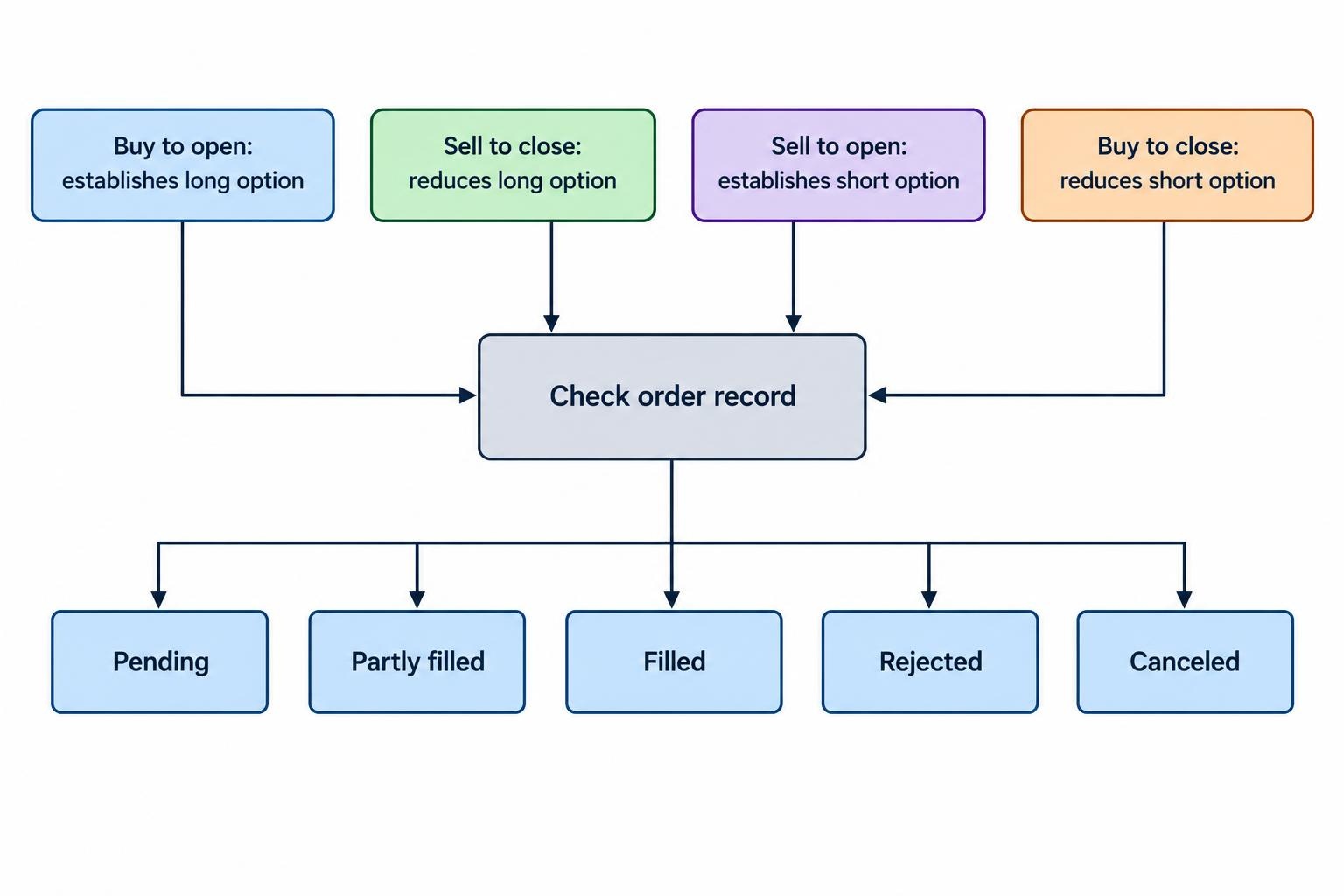
Check the position effect as carefully as the price. Buying to open establishes a long option; selling to close reduces it. Selling to open establishes a short option; buying to close reduces it. An app may infer these instructions, but read the resulting position before confirming. The guide to mobile trading order types covers the broader differences between limit, market and stop instructions.
For a spread, review every leg and the combined debit or credit. Where supported, submitting the intended spread as a combined order avoids deliberately placing its legs separately. After submission, inspect the order record: pending, partly filled, filled, rejected and canceled describe different outcomes.
Size the Trade in Dollars, Not Contract Counts
“Only one contract” is not a position sizing method. Compare the dollar exposure with your account and loss budget. Include entry and exit costs, then consider whether exercise or assignment could create a much larger share position.
Consider a hypothetical purchase of one call with a $50 strike, a $2 premium and a 100 share multiplier. The premium costs $200 before fees. At expiration, the call’s break even price is $52 before costs. If the underlying finishes at $51, its $100 intrinsic value is still $100 less than the premium paid. Being in the money does not necessarily mean being profitable.
Before expiration, the option can trade above or below the original premium without the stock reaching that expiration break even price. Do not use the app’s break even label as a universal exit threshold.
If your planned trade loss budget is $150, a $200 long option exceeds that budget when assessed on full premium loss. Planning to exit earlier does not make the remaining loss exposure disappear. The guide to position sizing for mobile traders develops this account level calculation.
Plan for Exercise, Assignment and Expiration
American style options can be exercised before expiration, and a short leg can be assigned while other legs remain open. Assignment can require action even when the original spread had a defined expiration payoff. FINRA’s guidance on options assignment details the resulting share delivery and purchase obligations.
For a hypothetical $50 equity call covering 100 shares, exercising requires $5,000 to purchase the shares, excluding costs. That is separate from the premium originally paid. Do not assume an in the money equity option simply pays its displayed profit into your cash balance.
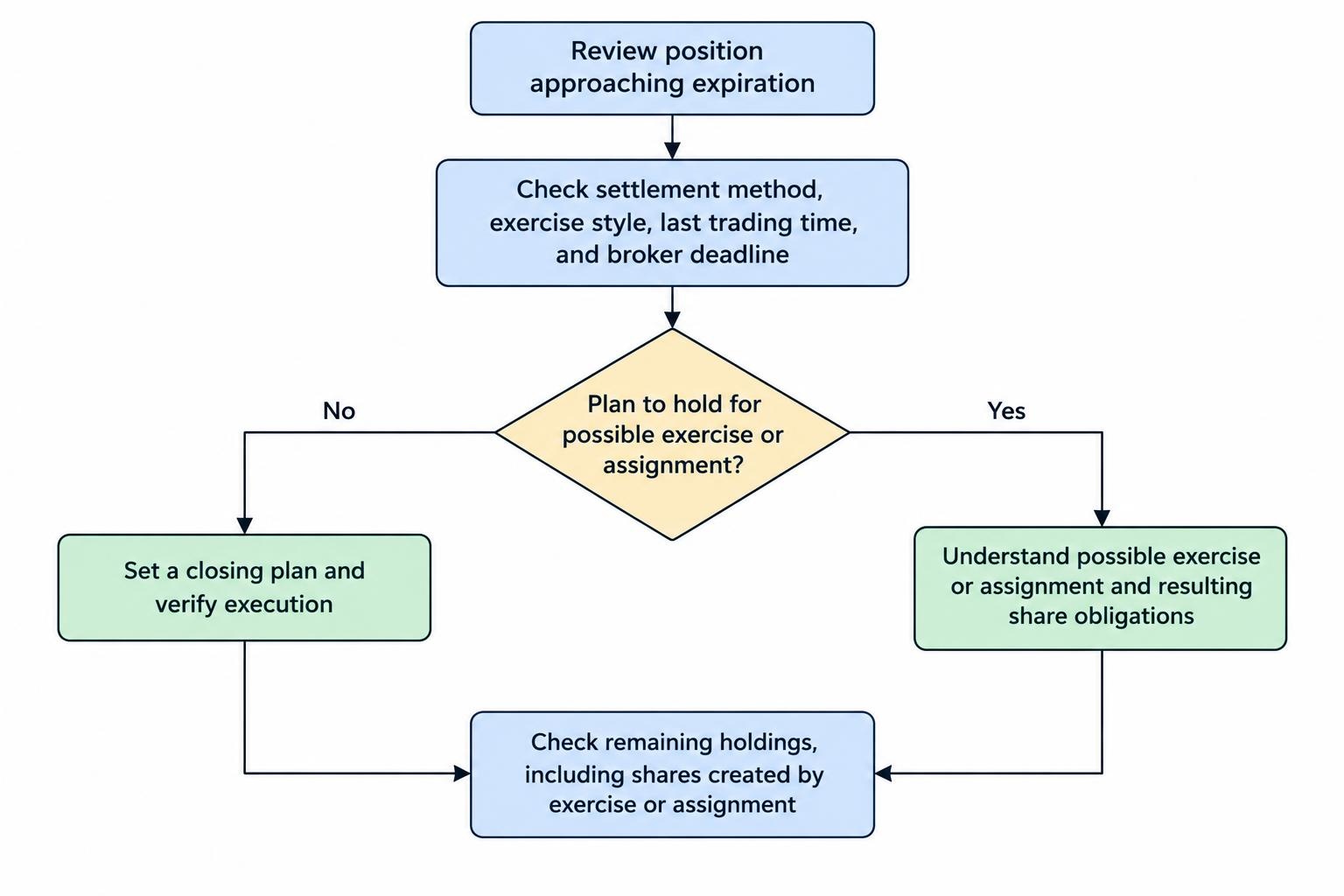
Before holding any position into expiration, confirm its settlement method, exercise style, last trading time and your broker’s instruction deadline. Check whether exercise happens automatically under the applicable procedures and how to submit contrary instructions. Do not assume cash settled index options follow the same process as stock options.
If you do not intend to receive or deliver shares, establish a closing plan early enough to address an unfilled order. A submitted closing order is not a closed position. Verify the execution and then check the remaining holdings, including any shares created through exercise or assignment.
Build a Mobile Workflow That Allows for Interruptions
Before entering, decide what you will do if the app freezes or your connection drops. Keep an alternative account access method and the broker’s support details available. If an order’s status is uncertain, check the order history before submitting it again; a frozen screen does not prove the first order failed.
Use alerts as prompts to review a position, not as substitutes for an exit plan. Check the option itself as well as the underlying security. Set aside time to inspect positions before expiration deadlines rather than relying on a notification arriving at a convenient moment.
A compact pretrade check is enough if you use it consistently:
- Confirm the full contract identity, quantity and opening or closing instruction.
- Review current quotes, the limit price and total debit or credit.
- Calculate the loss exposure and any resulting share obligation.
- Record the exit plan, expiration deadline and backup access method.
Practice the workflow in a simulation if one is available, including modifying and canceling orders. Treat simulated fills as practice with the interface, not proof of live execution quality. Mobile options trading works best when the phone handles a prepared decision, rather than becoming the place where the decision, risk calculation and order check all happen at once.