Mobile futures trading means opening, monitoring and closing futures positions through a smartphone or tablet. The device changes how you manage the trade, not the contract’s size, price sensitivity or settlement obligations. A small order ticket can still represent substantial market exposure.
The practical question is not whether an app has enough indicators. It is whether you can identify the correct contract, calculate the money at risk, enter orders accurately and respond when something goes wrong. This guide focuses on exchange traded futures, rather than CFDs that track futures prices or perpetual contracts offered by cryptocurrency platforms.
Futures are not suitable for every account. Losses can exceed the initial margin deposit, and the trader remains responsible for the shortfall. The CFTC’s guidance on futures account obligations also makes clear that these trading accounts are not insured. Mobile access does not reduce those financial risks.
What Your Mobile Futures App Needs to Show
Before considering chart layouts, check whether the app presents the information needed to place and manage a trade. Prioritize the contract name, expiration month, quantity, working orders, account equity and available margin. You should not have to search through several screens to discover how many contracts you hold.
Distinguish the analysis chart from the instrument on the order ticket. A continuous futures chart joins contract histories for analysis; it is not a substitute for checking the actual delivery month you are buying or selling. Confirm the full contract description before submitting an order, especially around rollover.
Use the following checks when evaluating a mobile platform. Treat them as questions to verify in the app and its documentation, not features that every provider necessarily offers.
| Area | What to check | Why it matters |
|---|---|---|
| Contract identification | Product, exchange, month and year appear clearly | Similar symbols can represent different exposures |
| Market data | Live or delayed status and quote timestamps are visible | A moving chart alone does not establish that prices are current |
| Order controls | Quantity, order type, duration and attached exits are easy to review | Fast entry is useful only when the instructions are correct |
| Account monitoring | Equity, margin usage and open profit or loss are accessible | A price chart does not show the account’s remaining capacity |
| Recovery options | Alternative access and support procedures are documented | The phone should not be your only way to manage the account |
Practice moving between the chart, order ticket and position screen before funding a live account. If an ordinary task requires hurried tapping, change the layout or reconsider whether that workflow belongs on a phone.
Calculate Contract Exposure Before Placing an Order
Futures quantity is measured in contracts, but one contract is not a standard amount of risk across markets. Calculate exposure using the contract multiplier and tick value. The tick is the smallest permitted price movement; its cash value determines how quickly a position gains or loses money.
The CME Micro E-mini S&P 500 contract specifications provide a useful example: MES has a multiplier of $5 per index point and a minimum price increment of 0.25 points. That makes each tick worth $1.25 per contract.
Suppose, purely for illustration, you buy one MES contract at 6,000 and plan an exit at 5,990 if the trade moves against you. The 10 point distance represents $50 before fees and any difference between the intended exit and actual fill. Two contracts double that planned price risk to $100. At the hypothetical entry price, one contract represents $30,000 of notional exposure: 6,000 multiplied by $5.
These figures answer different questions. Notional value measures exposure; the planned exit distance estimates trade risk; margin determines the collateral needed to carry the position. None should be mistaken for the others.
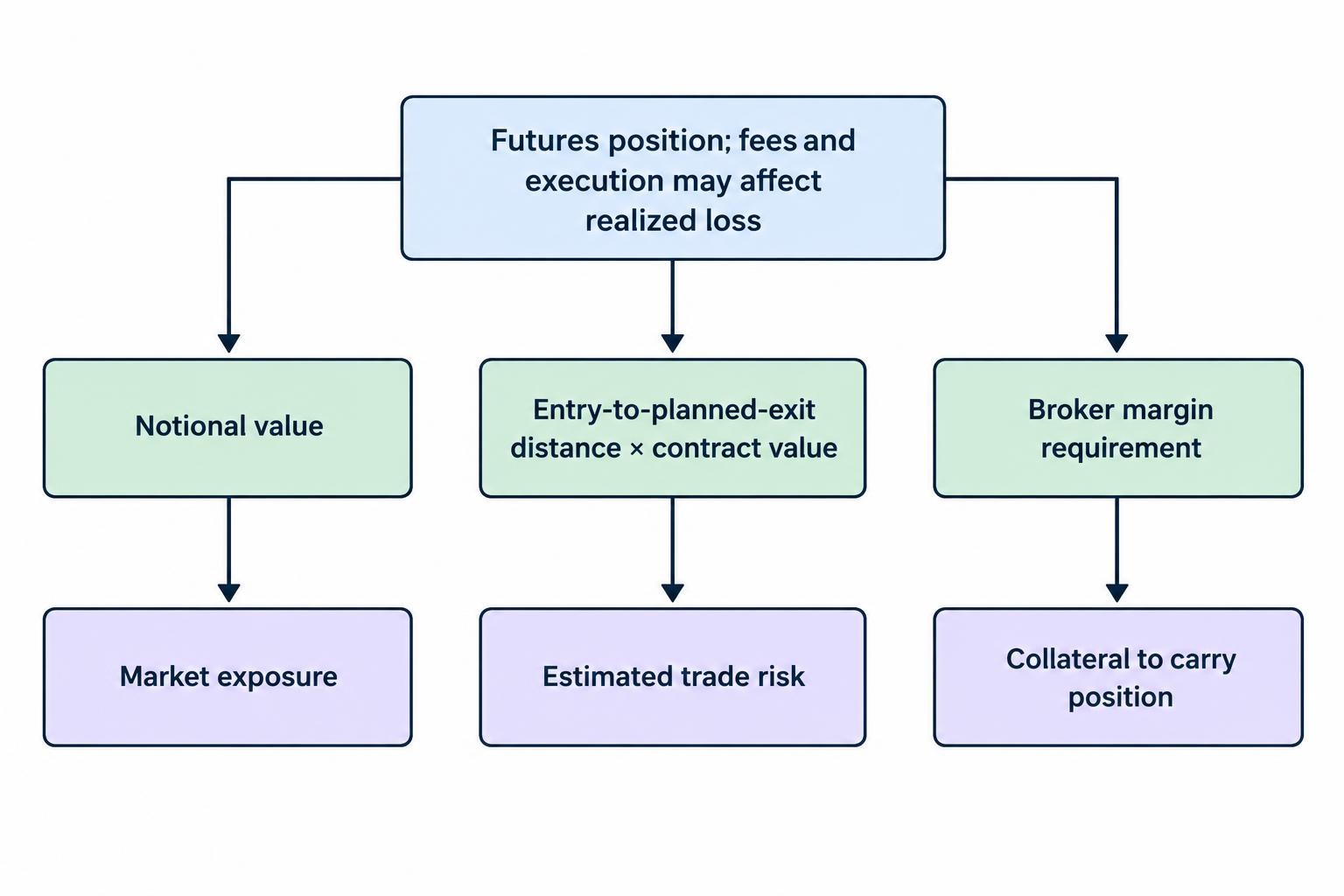
Smaller contracts can make sizing more precise, but “micro” is a contract label, not a safety rating. If the smallest available contract exceeds your risk budget at a sensible exit distance, skip the trade. Do not move the exit closer simply to make the arithmetic look comfortable. The broader process is covered in position sizing for mobile traders.
Margin Is Collateral, Not a Spending Allowance
Initial margin is the collateral required to establish a futures position. Maintenance margin is the minimum equity requirement for maintaining it. Brokers may require more than the exchange minimum, and futures gains and losses feed into account equity through settlement. These distinctions appear in the CFTC futures glossary’s margin and settlement definitions.
Check the broker’s current requirements for the exact product and the period you intend to hold it. If reduced intraday margin is available, establish when it ends, what requirement replaces it and how the firm handles a shortfall. Do not assume that an order accepted during the session can remain open overnight on the same terms.
Keep a cash buffer rather than treating every available dollar as permission to add another contract. A useful planning exercise is to calculate what happens after the intended loss, a worse fill and applicable charges. Would the remaining account still meet the firm’s requirements? Would you be tempted to add funds just to avoid closing a losing position?
On mobile, keep account equity and margin information close to the position view. If the app displays several balances, learn what each means before trading. Available cash, buying power and withdrawable funds are not labels to interpret under pressure.
Build an Order Entry Routine That Resists Mistakes
Speed should come after accuracy. Keep trade confirmations enabled until you can reliably check direction, quantity, contract month and order instructions. A saved quantity from an earlier session can turn a reasonable trade into a much larger commitment.
Use a short sequence before every submission:
- Confirm the product, contract month and trading account.
- Check buy or sell, quantity and intended entry price.
- Review the order type, duration and any attached exits.
- After submission, verify the order status and actual filled quantity.
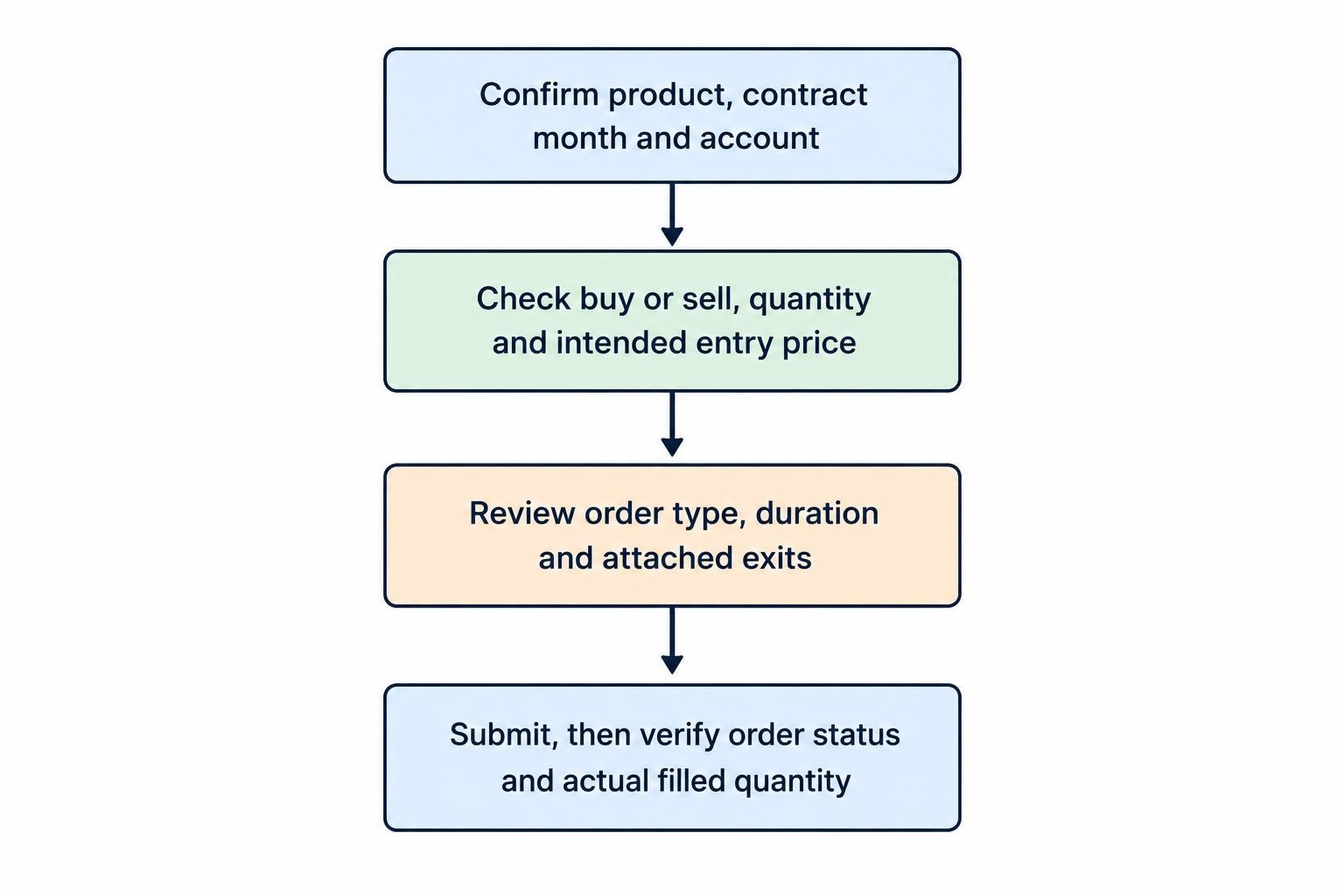
An order submission is not the same as a fill. A cancellation request is not the same as a confirmed cancellation. If the app pauses after you tap, inspect the order record before trying again. Repeated tapping is a poor substitute for confirmation.
Protective orders also need inspection. Where the platform supports bracket orders, check how the stop and target relate to the filled position, including partial fills. Ask how linked orders behave when one exit executes and whether any part of that logic depends on the app staying connected.
A stop order does not promise an exact exit price. A stop limit order introduces a different problem: it may remain unfilled if the market moves beyond its permitted price. Choose between those risks deliberately rather than selecting whichever label sounds safer. See mobile trading order types for the wider comparison.
Check Market Data, Trading Sessions and Total Costs
Before relying on a mobile quote, verify that your account has the required market data access. Check whether the chart, order book and order ticket use the same feed and whether any displayed prices are delayed. Compare timestamps rather than judging freshness from animation.
Also check the product’s current session schedule, scheduled breaks and holiday arrangements. Set the app’s time zone deliberately. A reminder entered in local phone time is not useful if you have misunderstood the exchange time shown beside the contract.
For a phone based workflow, choose a trading window that allows uninterrupted attention. Plan around relevant economic releases and other scheduled events. If you cannot check orders during that window, reconsider opening a position that requires active supervision.
Compare the complete cost of entering and exiting, not just the headline commission. Review commissions, exchange and clearing charges, applicable regulatory fees, data subscriptions and platform charges in the provider’s fee schedule. Check whether quoted transaction charges apply per side or to a complete round trip.
As a hypothetical example, $2 of total transaction charges consumes 10% of a $20 gross trading profit, before any additional execution shortfall. This arithmetic matters when taking small targets or trading frequently. The mobile trading fees and costs guide covers the broader account cost checklist.
Manage Expiration and Rollover Deliberately
Futures have expiration dates and contract dependent settlement arrangements. Some settle in cash; others involve physical delivery obligations. Closing a position before expiration and rolling exposure into another month are different actions from holding through settlement. The CME guide to futures expiration and settlement sets out those distinctions.
For every product you trade, record the relevant last trading day, any applicable first notice date and the broker’s own holding deadline. Check those details for the actual contract month. Do not rely on a generic reminder that says only “expiry approaching.”
Rolling normally means closing the existing month and opening another. Plan for both transactions, their costs and any price difference between the months. Do not interpret that difference automatically as profit or loss caused by the roll itself.
On a phone, review working orders during the change. Updating a watchlist or chart does not establish that the position and its exits now reference the intended month. Verify each separately. Use calendar reminders early enough to make a decision rather than forcing one at the deadline.
Prepare for a Lost Connection Before You Need To
Do not assume that every order disappears when the phone disconnects. Equally, do not assume that every protective feature continues operating. Establish where orders and linked order instructions are held, which functions require a running app, and what alternative access the broker supports.
Save the provider’s support details outside the trading app. Ask whether telephone order handling is available, what identification is required, when the service operates and whether charges apply. Keep account information secure; recovery planning should not involve leaving passwords in an unprotected note.
If the screen freezes, check connectivity and use an alternative access method to verify positions and working orders before submitting anything new. Avoid creating contradictory instructions from two devices. A backup connection is useful only if you can log in and interpret the account state correctly.
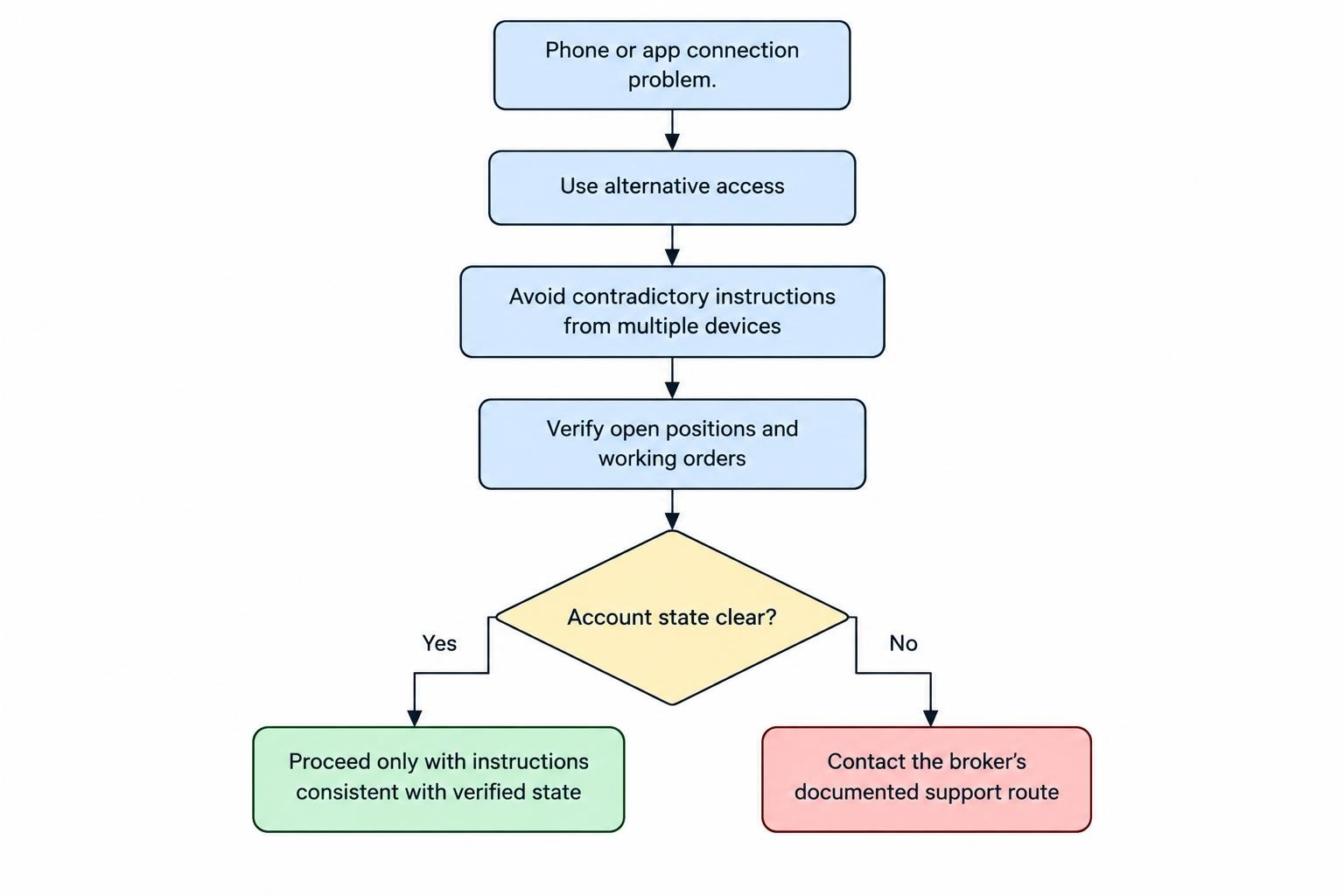
The immediate priority is establishing what exposure exists, not repairing every phone setting while a position remains uncertain. Use the separate procedure for a trading app disconnection with open positions when building that contingency plan.
Check the Firm, Then Rehearse the Workflow
For a U.S. futures account, check the firm’s registration and disciplinary background through NFA’s investor verification guidance and BASIC access. Match the legal entity and contact details, not just the app’s brand name. Registration checks are part of due diligence, not an endorsement of a trading strategy or a guarantee against loss.
Use a demo account to rehearse operational tasks: selecting the correct month, changing quantity, placing and cancelling orders, checking fills and reviewing account balances. Test how easily you can find the same information after rotating the screen or switching apps. Treat simulation as workflow practice, not evidence of likely live returns.
Mobile futures trading is most manageable when the process is deliberately narrow: a familiar contract, a defined trading window, a precomputed position size and a tested recovery route. Before each live order, be able to state the cash value of a tick, the planned loss, the applicable margin requirement and the next contract deadline. If any answer requires a hurried search, leave the order unsubmitted.